<?xml version="1.0" encoding="UTF-8"?><feed
	xmlns="http://www.w3.org/2005/Atom"
	xmlns:thr="http://purl.org/syndication/thread/1.0"
	xml:lang="en-US"
	>
	<title type="text">David Pierce | The Verge</title>
	<subtitle type="text">The Verge is about technology and how it makes us feel. Founded in 2011, we offer our audience everything from breaking news to reviews to award-winning features and investigations, on our site, in video, and in podcasts.</subtitle>

	<updated>2026-10-24T01:16:47+00:00</updated>

	<link rel="alternate" type="text/html" href="https://www.theverge.com/author/david-pierce" />
	<id>https://www.theverge.com/authors/david-pierce/rss</id>
	<link rel="self" type="application/atom+xml" href="https://www.theverge.com/authors/david-pierce/rss" />

	<icon>https://platform.theverge.com/wp-content/uploads/sites/2/2025/01/verge-rss-large_80b47e.png?w=150&amp;h=150&amp;crop=1</icon>
		<entry>
			
			<author>
				<name>David Pierce</name>
			</author>
			
			<title type="html"><![CDATA[It’s time to find a new browser]]></title>
			<link rel="alternate" type="text/html" href="https://www.theverge.com/tech/1018121/cod-4-claude-duet-wildwood-installer" />
			<id>https://www.theverge.com/?p=1018121</id>
			<updated>2026-10-23T21:16:47-04:00</updated>
			<published>2026-10-24T08:00:00-04:00</published>
			<category scheme="https://www.theverge.com" term="Gadgets" /><category scheme="https://www.theverge.com" term="Installer" /><category scheme="https://www.theverge.com" term="Streaming" /><category scheme="https://www.theverge.com" term="Tech" />
							<summary type="html"><![CDATA[Hi, friends! Welcome to Installer No. 149, your guide to the best and Verge-iest stuff in the world. (If you’re new here, welcome, happy It Actually Feels Like Fall Now At Least In My Neighborhood), and also you can read all the old editions at the Installer homepage.) This week, I’ve been reading about Demis [&#8230;]]]></summary>
			
							<content type="html">
											<![CDATA[

						
<figure>

<img alt="" data-caption="" data-portal-copyright="Image: David Pierce / The Verge" data-has-syndication-rights="1" src="https://platform.theverge.com/wp-content/uploads/sites/2/2026/10/Installer-149.jpg?quality=90&#038;strip=all&#038;crop=0,0,100,100" />
	<figcaption>
		</figcaption>
</figure>
<p class="wp-block-paragraph">Hi, friends! Welcome to <em>Installer</em> No. 149, your guide to the best and <em>Verge</em>-iest stuff in the world. (If you’re new here, welcome, happy It Actually Feels Like Fall Now At Least In My Neighborhood), and also you can read all the old editions at the <a href="https://www.theverge.com/installer-newsletter"><em>Installer</em> homepage</a>.)</p>

<p class="wp-block-paragraph">This week, I’ve been reading about <a href="https://www.wsj.com/tech/ai/demis-hassabis-ai-deepmind-google-isomorphic-2b4e3153"><strong>Demis Hassabis</strong></a> and <a href="https://www.newyorker.com/magazine/2026/10/26/computer-chips-are-the-most-magnificent-things-weve-ever-made"><strong>computer chips</strong></a> and <a href="https://www.technologyreview.com/2026/10/22/1147591/permafrost-primer/"><strong>permafrost</strong></a>, enjoying the first episodes of <a href="https://machinegods.fm/"><strong><em>Machine Gods</em></strong></a>, <em></em>filming the next season of <a href="https://pod.link/1840983742"><strong><em>Version History</em></strong></a> (pet season!), seeing <a href="https://www.themoviedb.org/movie/1765072-you-can-see-everything?language=en-US"><strong><em>You Can See Everything</em></strong></a> <em></em>and then reading and listening to absolutely everything about it, painstakingly updating all the stuff in my <a href="https://1password.com/"><strong>1Password</strong></a>, making tiny documents with <a href="https://tinylittleoffice.com/"><strong>Tiny Little Office</strong></a>, watching Conan O’Brien own <a href="https://www.youtube.com/watch?v=igtUSJlxgJQ"><strong><em>Subway Takes</em></strong></a> <em></em>the way he once owned <a href="https://www.youtube.com/watch?v=FALlhXl6CmA"><strong><em>Hot Ones</em></strong></a>, <em></em>finally getting properly good at <a href="https://www.capcut.com/"><strong>CapCut</strong></a>, and blasting the soundtrack to <a href="https://open.spotify.com/album/2LrB8jQ7d0OEdHOmEZWfJn?si=E418QNSWTdqjgy7B6bWihw"><strong><em>The Mandalorian and Grogu</em></strong></a> all workday long.</p>

<p class="wp-block-paragraph">I also have for you a new AI assistant, the most Duo-y new app for the iPhone Duo, my hunt for the next great browser, and much more. Let’s do this.</p>

<p class="wp-block-paragraph">(As always, the best part of <em>Installer</em> is your ideas and tips. What are you playing / reading / watching / listening to / modding with Claude this week? Tell me everything: <a href="mailto:installer@theverge.com">installer@theverge.com</a>. And if you know someone else who might enjoy <em>Installer</em>, forward it to them and tell them to <a href="https://www.theverge.com/subscribe">subscribe here</a>.)</p>

<hr class="wp-block-separator has-alpha-channel-opacity" />

<h2 class="wp-block-heading">The Drop</h2>

<ul class="wp-block-list">
<li><a href="https://www.amazon.com/Call-Duty-Modern-Warfare-Standard-PlayStation/dp/B0H37MKQ64?th=1"><strong><em>Call of Duty: Modern Warfare 4</em></strong></a><strong>.</strong> Obviously, <em>Grand Theft Auto VI</em> is the biggest game release of the year, but a new <em>COD</em> is always a big deal. This one doesn’t sound like some grand reinvention of the form, but rather an even more playable, even more powerful version of what works. I was particularly excited to hear that the campaign mode is a huge improvement this time.</li>


<li><a href="https://www.amazon.com/dp/B0GWS5RCRK"><strong>The Blink Mini 4K</strong></a><strong>.</strong> Ring cameras get a lot more shine, but Amazon’s cheaper brand also makes some pretty good stuff. This one’s part of a whole new lineup of devices, but $80 for a 4K camera with two-way audio and plenty of smart security features? Not a bad deal.</li>


<li><a href="https://www.justwatch.com/ca/justwatch-tv"><strong>JustWatch TV</strong></a><strong>.</strong> As streaming services get incessantly more expensive, I’m starting to bail on some paid services and spend more time on the free ones. JustWatch’s new service is surprisingly well-stocked out of the gate — I suspect they’ve been watching what people search for, and making some smart content bets.</li>


<li><a href="https://claude.com/product/claude-duet"><strong>Claude Duet</strong></a><strong>.</strong> Here’s Anthropic’s answer to Muse, Instinct, and Dots. Duet seems to be focused on helping you get stuff done at work by making to-do lists, coordinating meetings, and compiling data for you. Still waitlist-only right now, but it’ll be interesting to see if it’s as thirsty for attention as Muse is.</li>


<li><a href="https://www.themoviedb.org/movie/791523-wildwood?language=en-US"><strong><em>Wildwood</em></strong></a><strong>.</strong> Before you see this gorgeous, by all accounts excellent <a href="https://www.theverge.com/entertainment/1016647/wildwood-travis-knight-interview-ai-laika-stop-motion">stop-motion movie</a>, read everything you can about <a href="https://www.goldderby.com/film/2026/wildwood-laika-oral-history-lord-of-the-rings-stop-motion-animation-travis-knight-interviews-oscars/">how it was made</a>. Not a pixel of generative AI in sight, just an unbelievable amount of hard work and human creativity. Humans rock, artists rock, this movie rocks.</li>


<li><a href="https://teenage.engineering/store/ep-35"><strong>The Teenage Engineering EP-35</strong></a><strong>.</strong> When you go to buy this thing, it’s technically called “Life is fantastic!” Which, sure. <a href="https://www.theverge.com/gadgets/1017022/teenage-engineering-ep-35-instrument-amp">This thing</a> is a battery powered, multi-input, multi-instrument amp with lots of effects. As always, it is extremely cool-looking. I have no use for it, and I want it quite badly.</li>


<li><a href="https://www.amazon.com/Nintendo-SwitchTM-Sports-Resort-Switch-2/dp/B0H4P1YH4P/"><strong><em>Nintendo Switch Sports Resort</em></strong></a><strong>.</strong> Nintendo basically hasn’t changed the formula here since <em>Wii Sports</em> from two decades ago, and I have absolutely no problem with that. Anything that gives me that super-active tennis and bowling (plus volleyball, boxing, thumb wrestling, and more) is <a href="https://www.theverge.com/entertainment/1013753/nintendo-switch-sports-resort-review-switch-2">a win</a> in my book.</li>


<li><a href="https://apps.apple.com/us/app/delta-game-emulator/id1048524688"><strong>Delta 2.0</strong></a><strong>.</strong> The next couple of weeks are going to be full of interesting app updates as developers try to figure out what to make of <a href="https://www.theverge.com/tech/1015028/iphone-duo-review">Apple’s foldable phone</a>. But one of the best is already available; Delta can now pretty successfully cosplay as any handheld console ever. (Plus the Sega Genesis!)</li>


<li><a href="https://www.amazon.com/Browse-Kindle-Unlimited-Books/b?ie=UTF8&amp;node=9069934011"><strong>Kindle Plus</strong></a><strong>.</strong> This is mostly just a rebranding of Kindle Unlimited, but Amazon put a couple of interesting new features in its $12 monthly reading subscription, including AI-narrated audiobooks. I am dubious of those, but excited about expanding access to audiobooks. We’ll see.</li>
</ul>

<hr class="wp-block-separator has-alpha-channel-opacity" />

<h2 class="wp-block-heading">Spotlight</h2>

<p class="wp-block-paragraph">The worst news of the week here in the Installerverse is that <a href="https://arc.net/"><strong>Arc is going away</strong></a>. This was obviously coming: The Browser Company bailed on Arc two years ago in favor of the more AI-centric Dia, and Arc has been in maintenance mode ever since. But now it’s not just being ignored, it’s going away. By Christmas, you won’t even be able to use the app anymore.</p>

<p class="wp-block-paragraph">So now a lot of us are stuck looking for another browser. There are a million new ones out there, many of them somewhere between “heavily inspired by Arc” and “a direct copy of Arc I made in Codex this morning.” I need to test a lot of them. I don’t know exactly where I’ll land yet, but I figured I’d share a bunch of the ones I’m looking at:</p>

<ul class="wp-block-list">
<li><a href="https://www.diabrowser.com/"><strong>Dia</strong></a><strong>.</strong> It <em>has</em> recently gotten a lot of Arc’s best features, and some of the AI stuff is pretty cool. (And mercifully easy to turn off.) The Browser Company’s attention to aesthetic detail remains the best in the biz, so I’m starting here.</li>


<li><a href="https://zen-browser.app/"><strong>Zen</strong></a><strong>.</strong> A total ripoff of Arc, and I mean that as a compliment. Zen runs on Mozilla’s Gecko engine rather than Chromium, which is a win for anyone looking for a little less Google influence in their lives. Last time I tried Zen it was a little buggy and unpolished, but I’ve heard it’s come a long way.</li>


<li><a href="https://orionbrowser.com/"><strong>Orion</strong></a><strong>.</strong> I am a dedicated and very happy Kagi user, and I’ve heard good things about how simple and resource-friendly the company’s browser is. Given the seamless Kagi integration, I sort of hope this one wins for me.</li>


<li><a href="https://vivaldi.com/"><strong>Vivaldi</strong></a><strong>.</strong> I used Vivaldi for a while, and I love how customizable it is. I eventually got it set up exactly the way I wanted it. But right next to all that customization is just a feeling of fiddliness, and I couldn’t quite get comfortable in the browser. Might try again.</li>


<li><a href="https://helium.computer/"><strong>Helium</strong></a><strong>.</strong> The opposite of Vivaldi, this is a super minimalist, no-frills browser. It’s probably what I need, honestly.</li>


<li><a href="https://www.firefox.com/en-US/&apos;"><strong>Firefox</strong></a><strong>.</strong> Its confusing stance on AI aside, I like a lot of the recent design and feature choices Firefox has made. I’m also intrigued by some of the Firefox forks, like <a href="https://www.waterfox.com/"><strong>Waterfox</strong></a> and <a href="https://floorp.app/"><strong>Floorp</strong></a>, which give it even more customization options.</li>


<li><a href="https://brave.com/"><strong>Brave</strong></a><strong>.</strong> Brave has always felt too heavy to me, and like it’s always trying to convince me to use more of its own proprietary (and often underpowered) features. But it seems to always win in privacy comparisons, so I might need to give it a go again.</li>
</ul>

<p class="wp-block-paragraph">On mobile, it’s easy. <a href="https://quiche.industries/browser/"><strong>Quiche</strong></a> is my favorite iOS browser by a mile. Arc was never great on Android, so I’m betting most of us never switched there in the first place.</p>

<p class="wp-block-paragraph">There are also the default browsers, of course, like Chrome, Safari, and Edge. But each of those browsers continues to fail me in one way or another, and so my search continues. If you’ve found your browser of the future, tell me all about it! Otherwise, I’ll report back here periodically through my journey.</p>

<hr class="wp-block-separator has-alpha-channel-opacity" />

<h2 class="wp-block-heading">Crowdsourced</h2>

<p class="wp-block-paragraph"><em>Here’s what the</em> Installer <em>community is into this week. I want to know what you’re into right now as well! Email</em> <a href="mailto:installer@theverge.com"><em>installer@theverge.com</em></a> <em>or message me on Signal —&nbsp;@davidpierce.11 — with your recommendations for anything and everything, and we’ll feature some of our favorites here every week. For even more great recommendations, check out the replies to</em> <a href="https://www.threads.com/share/KjQ6SqQLa/"><em>this post on Threads</em></a> <em>and</em> <a href="https://bsky.app/profile/davidpierce.xyz/post/3myipabeovk23"><em>this post on Bluesky</em><em>.</em></a></p>

<p class="wp-block-paragraph">“<a href="https://www.themoviedb.org/tv/285418-youth?language=en-US"><strong><em>Youth</em></strong></a> is an absolute SCREAM on HBO Max at the moment.” — Jonathan</p>

<p class="wp-block-paragraph">“<a href="https://www.todoist.com/"><strong>Todoist</strong></a> has a stellar integration with Siri AI that has finally made me fully commit to just using it If you delete Reminders, Todoist becomes the default on Siri AI and you can add a to-do to any project with tag AND location support (using Apple Maps saved locations like home and work!). The best part is that it all works WITHOUT having to say ‘&#8230; in todoist’ at the end of each query!” — Sajishnu</p>

<p class="wp-block-paragraph">“Apple <a href="https://9to5mac.com/2026/10/19/homepod-sound-glow-colorful-light/"><strong>added Sound Glow</strong></a> to existing HomePod models and it’s just kinda fun to watch the light on top of HomePod glow and flash. So I’m doing that with some of my favorite playlists.” — Connor</p>

<p class="wp-block-paragraph">“I’m reading a book called <a href="https://www.simonandschuster.com/books/How-to-Read-a-Book/Mortimer-J-Adler/9781476790152"><strong><em>How to Read a Book</em></strong></a> by Mortimer J. Adler because I want to get better at analysis and reading for understanding vs. absorbing basic information.” — Rhoades</p>

<p class="wp-block-paragraph">“My girlfriend took a train ride up the west coast and reported that no less than four different people asked her if her 2024 <a href="https://www.samsung.com/levant/smartphones/galaxy-z-flip6/"><strong>Samsung Galaxy Z-Flip 6</strong></a> was the new iPhone Duo.” —&nbsp;Nicholas</p>

<p class="wp-block-paragraph">“I recently read <a href="https://us.macmillan.com/books/9781250341655/bodiesofmagic/"><strong><em>Bodies of Magic</em></strong></a> by Freya Marske, and it was excellent. What if med school was magical, but everyone was still sleeping with each other and stressing over student loans? Then an unexpected dead body shows up during finals.” — Emmett</p>

<p class="wp-block-paragraph">“I got a <a href="https://frame.work/products/laptop13pro-diy-intel-ultra-3/configuration/new"><strong>Framework Laptop 13 Pro</strong></a> running Ubuntu last month, and I&#8217;m really happy with it. (I haven&#8217;t done anything with Linux in maybe 20 years —&nbsp;it&#8217;s come a long way!) So now I&#8217;m trying to see if I can replace Capture One with <a href="https://www.darktable.org/"><strong>Darktable</strong></a>. If I can, that would break my last tie to macOS, and I&#8217;ll replace my iMac with a Framework Desktop.” — Morgan</p>

<p class="wp-block-paragraph">“Exploring the new Nektropos Castle dungeon in <a href="https://www.everquestlegends.com/home"><strong><em>EverQuest Legends</em></strong></a>. The game has been such a nostalgia trip back to 1999, but new content in an ancient game is a bizarre delight.” — Alex</p>

<p class="wp-block-paragraph">“Setting up <a href="https://www.navidrome.org/"><strong>Navidrome</strong></a> and having Claude build me a definitive ‘Songs From the Black Hole’ playlist from my Weezer MP3 collection. (It&#8217;s harder than first appears: is ‘Lisa’ track 12 or not!?)” — Micheal</p>

<p class="wp-block-paragraph">“Best Buy had a pretty insane deal on a <a href="https://bambulab.com/en-us/a1-mini"><strong>Bambu A1 Mini</strong></a>, so we got my 12 year old son a 3D printer for his birthday. It&#8217;s amazing how easy it was to put out a seemingly perfectly accurate PLA print, compared to horror stories from older printers.” — Jeff</p>

<hr class="wp-block-separator has-alpha-channel-opacity" />

<h2 class="wp-block-heading">Signing off</h2>

<p class="wp-block-paragraph">Last week, my wife and I went car shopping. Our plan was just to drive a bunch of cars — we knew we needed something with three rows, and really had no experience with any of them — and then go home. Somehow, a few hours later, we were the proud and slightly bewildered owners of a new <a href="https://www.kia.com/us/en/carnival-mpv"><strong>Kia Carnival</strong></a>.</p>

<p class="wp-block-paragraph">So far the car has been great, but <em>wow</em> are there a lot of weird tech ideas in cars now. I’m good with CarPlay and Android Auto. I hate how much everything has become a touchscreen. But I’m most thrown by how many features of my car now exist in a companion app. How do we feel about this? I almost miss when I had no idea what to do about the check engine light.</p>

<p class="wp-block-paragraph">Anyway, I’m a minivan dad now. I think I’m okay with it. Send car tips! Send minivan tips! Send help! See you next week!</p>
						]]>
									</content>
			
					</entry>
			<entry>
			
			<author>
				<name>David Pierce</name>
			</author>
			
			<title type="html"><![CDATA[The iPhone Duo should have been an iPad]]></title>
			<link rel="alternate" type="text/html" href="https://www.theverge.com/podcast/1017447/iphone-duo-ipad-review-score-vergecast" />
			<id>https://www.theverge.com/?p=1017447</id>
			<updated>2026-10-23T13:00:18-04:00</updated>
			<published>2026-10-23T13:00:18-04:00</published>
			<category scheme="https://www.theverge.com" term="AI" /><category scheme="https://www.theverge.com" term="Apple" /><category scheme="https://www.theverge.com" term="iPhone" /><category scheme="https://www.theverge.com" term="Podcasts" /><category scheme="https://www.theverge.com" term="Tech" /><category scheme="https://www.theverge.com" term="Vergecast" />
							<summary type="html"><![CDATA[We gave the iPhone Duo a 7 /10. But that wasn’t always the score we planned, and it might not be the right score forever. Such are the challenges of reviewing — and assessing — a big, new idea about the most popular smartphone in history. On this episode of The Vergecast, David and Nilay [&#8230;]]]></summary>
			
							<content type="html">
											<![CDATA[

						
<figure>

<img alt="Vergecast hosts David Pierce and Nilay Patel are pictured with an iPhone Duo." data-caption="" data-portal-copyright="Image: Alex Parkin / The Verge" data-has-syndication-rights="1" src="https://platform.theverge.com/wp-content/uploads/sites/2/2026/10/VRG_VST_102326_Site_attempt.jpg?quality=90&#038;strip=all&#038;crop=0,0,100,100" />
	<figcaption>
		</figcaption>
</figure>
<p class="wp-block-paragraph">We <a href="https://www.theverge.com/tech/1015028/iphone-duo-review">gave the iPhone Duo a 7 /10</a>. But that wasn’t always the score we planned, and it might not be the right score forever. Such are the challenges of reviewing — and assessing — <a href="https://www.theverge.com/tech/1010131/apple-iphone-duo-news-announcements">a big, new idea</a> about the most popular smartphone in history. </p>

<p class="wp-block-paragraph">On <a href="https://pod.link/vergecast">this episode of <em>The Vergecast</em></a>, David and Nilay debate whether the Duo deserved the score it got, and try to work through how this device might change over time. Is the outer screen, as Daring Fireball’s John Gruber suggested, <a href="https://daringfireball.net/2026/10/the_iphone_duo">the worst iPhone ever</a>? Would it be a better product if it started as an iPad rather than an iPhone? Would we feel differently about this thing if it were simply called the iPad Duo? It’s easy to see how the Duo will improve over time, but will it ever be the phone for everyone?</p>

<p class="wp-block-paragraph">After that, the hosts talk about <a href="https://www.theverge.com/tech/1016574/php2shell-security-vulnerability-websites-down">the huge PHP cybersecurity flaw</a> that rocked the web this week and what it means for the future of the web, AI, and everything. It was a strange week for the web in general, as the <a href="https://www.theverge.com/report/1015811/ai-shopping-agents-blocked-amazon-the-realreal-target-meta-muse">ongoing increase in AI shopping</a> has forced retailers everywhere to figure out how they <a href="https://www.theverge.com/ai-artificial-intelligence/1015715/walmart-ai-shopping-agents">want to interact</a> with customers — and by customers, we mean <a href="https://www.theverge.com/tech/1016029/10-million-people-have-already-set-up-muse-agents">Muse agents</a>. Then it’s time for Brendan Carr Is a Dummy, an <a href="https://www.theverge.com/streaming/1014826/netflix-earnings-q3-2026-viewing-time">impending reboot inside of Netflix</a>, and some <a href="https://www.theverge.com/tech/1014999/google-gemini-ai-cars-android-auto">very confusing Gemini news</a>.</p>

<iframe frameborder="0" height="200" src="https://playlist.megaphone.fm?e=VMP6148219444" width="100%"></iframe>

<p class="wp-block-paragraph"><a href="https://www.youtube.com/playlist?list=PL39u5ZEfYDEO5PaNRWyqloGY6zzJ1fjBa"><strong>Watch</strong></a> <strong>|</strong> <a href="https://bit.ly/3hkwRl2"><strong>Listen</strong></a> <strong>|</strong> <a href="https://www.theverge.com/bulletin/795051/verge-podcast-ad-free-set-up-how-to"><strong>Get ad-free</strong></a></p>

<p class="wp-block-paragraph">In case you missed it this week: We also talked about <a href="https://www.theverge.com/podcast/1014024/creator-app-developer-vergecast">vibe-coding creators</a>, <a href="https://www.theverge.com/podcast/1014663/ai-math-drama-openai-vergecast">chaos in the AI math world</a>, and <a href="https://www.theverge.com/podcast/1017094/tesla-roadster-flying-vergecast">the flying Tesla Roadster</a>. And we want to hear all your thoughts about all of it! Call the Vergecast Hotline at 866-VERGE11, send us an email at vergecast@theverge.com, and tell us everything that’s on your mind. And make sure you subscribe so you don’t miss an episode!</p>

<p class="wp-block-paragraph"></p>

<p class="wp-block-paragraph"></p>

<p class="wp-block-paragraph"></p>
						]]>
									</content>
			
					</entry>
			<entry>
			
			<author>
				<name>Antonio G. Di Benedetto</name>
			</author>
			
			<author>
				<name>David Pierce</name>
			</author>
			
			<author>
				<name>Dominic Preston</name>
			</author>
			
			<author>
				<name>Stevie Bonifield</name>
			</author>
			
			<title type="html"><![CDATA[Googlebooks just aren’t ready]]></title>
			<link rel="alternate" type="text/html" href="https://www.theverge.com/tech/1015749/googlebook-hp-acer-lenovo-dell-asus-collective-laptop-review" />
			<id>https://www.theverge.com/?p=1015749</id>
			<updated>2026-10-22T11:03:55-04:00</updated>
			<published>2026-10-22T09:00:00-04:00</published>
			<category scheme="https://www.theverge.com" term="Android" /><category scheme="https://www.theverge.com" term="Gadgets" /><category scheme="https://www.theverge.com" term="Google" /><category scheme="https://www.theverge.com" term="Laptop Reviews" /><category scheme="https://www.theverge.com" term="Laptops" /><category scheme="https://www.theverge.com" term="Reviews" /><category scheme="https://www.theverge.com" term="Tech" />
							<summary type="html"><![CDATA[Every Googlebook laptop we’ve tested so far has great hardware. The problem is the software. While Googlebook OS has exciting ideas for how a laptop and phone can work together, right now it’s mostly a frustrating experience filled with annoying bugs and lackluster app support. It often feels like using an Android tablet with a [&#8230;]]]></summary>
			
							<content type="html">
											<![CDATA[

						
<figure>

<img alt="A lineup of three Googlebooks (left to right: Acer Googlebook 14, Lenovo Googlebook 15, and HP Googlebook 14) in front of a colorfully lit background." data-caption="The Acer Googlebook 14 (left), Lenovo Googlebook 15 (center), and HP Googlebook 14 (right). | Photo: Antonio G. Di Benedetto / The Verge" data-portal-copyright="Photo: Antonio G. Di Benedetto / The Verge" data-has-syndication-rights="1" src="https://platform.theverge.com/wp-content/uploads/sites/2/2026/10/268755_Googlebooks_Lenovo_HP_Acer_laptop_review_ADiBenedetto_0001.jpg?quality=90&#038;strip=all&#038;crop=0,0,100,100" />
	<figcaption>
	The Acer Googlebook 14 (left), Lenovo Googlebook 15 (center), and HP Googlebook 14 (right). | Photo: Antonio G. Di Benedetto / The Verge	</figcaption>
</figure>
<p class="has-drop-cap wp-block-paragraph">Every Googlebook laptop we’ve tested so far has great hardware. The problem is the software. While Googlebook OS has <a href="https://www.theverge.com/tech/997972/googlebook-laptop-chromeos-android-history">exciting ideas</a> for how a laptop and phone can work together, right now it’s mostly a <a href="https://www.theverge.com/tech/1008563/googlebook-software-impressions-thoughts-roundtable">frustrating experience</a> filled with <a href="https://www.theverge.com/tech/1005745/google-googlebook-android-laptops-dell-acer-asus-lenovo-hp-impressions">annoying bugs</a> and <a href="https://www.theverge.com/tech/1008750/googlebooks-android-best-worst-notifications-app-cast-file-sharing">lackluster app support</a>. It often feels like using an Android tablet with a keyboard and trackpad grafted on, rather than a cohesive laptop OS. It’s too bad, because those keyboards and trackpads — and pretty much all the laptops’ hardware components — are great.</p>

<p class="wp-block-paragraph">Frankly, they should be. The cheapest is $900, a price where you start to expect quality processors, metal builds, higher-quality displays, good speakers, and great keyboards and trackpads (even haptic ones in some cases). The Googlebooks have those covered, and they also have very good battery life and at least 16GB of RAM.</p>

<p class="wp-block-paragraph">Google wanted Googlebooks to feel premium, and HP, Acer, Lenovo, Dell, and Asus all delivered. It’s Google’s software that needs to catch up. In their current state, we don’t recommend you buy any of them. But it’s worth reviewing the hardware to determine which shows the most promise if the software one day improves — or if crafty modders manage to install other operating systems. Since the software is the same on all Googlebooks (save for some preinstalled manufacturer apps), and we’ve already covered that software at length, we’re strictly talking about Googlebook hardware here. The scores, however, cover hardware and software as they stand today. Brace yourself — the scores are bad.</p>

<p class="wp-block-paragraph">If you’re a dedicated Google user or Pixel fan and you really want to be an early adopter / paying beta tester — or if you’re just here for some schadenfreude — here are our collective thoughts on each and every Googlebook.</p>
<div class="product-block"><h3>Acer Googlebook 14</h3>
<figure class="product-image"><img width="300" height="200" src="https://platform.theverge.com/wp-content/uploads/sites/2/2026/10/268755_Acer_Googlebook_14_laptop_review_ADiBenedetto_0001.jpg?w=300" class="attachment-medium size-medium" alt="" /></figure>
<div class="product-scores"><h4>Score: 4</h4><table class="product-pros-cons"><thead><tr><th>Pros</th><th>Cons</th></tr></thead><tbody><tr><td><ul><li>The most affordable of the Googlebooks (for now)</li><li>Nice screen and build</li></ul></td><td><ul><li>Googlebook OS feels like a beta</li><li>No portrait orientation in tablet mode</li></ul></td></tr></tbody></table></div>
<h3>Where to Buy:</h3><ul><li><a href="https://store.google.com/product/acer_googlebook"> $899 at <strong>Google</strong></a></li><li><a href="https://www.bestbuy.com/product/acer-googlebook-14-laptop-14-3k-oled-120hz-touchscreen-intel-core-ultra-5-series-3-2026-16gb-memory-512gb-storage-elemental-blue/JJ8V8HLZP2/sku/6690085"> $899 at <strong>Best Buy</strong></a></li><li><a href="https://www.acer.com/us-en/laptops/acer-googlebook/acer-googlebook-14"> $899.99 at <strong>Acer</strong></a></li></ul></div>
<p class="wp-block-paragraph">The Acer Googlebook 14 is the only 2-in-1 convertible of the bunch, and it’s one of the nicest-feeling and -looking Acers I’ve ever used at this price. It’s light, with a sturdy metal chassis and a great 2880 x 1800 / 120Hz OLED touchscreen with stylus support. I find 2-in-1s pretty handy, even if they look clunkier than tablets like a <a href="https://www.theverge.com/reviews/679175/microsoft-surface-pro-12-inch-review">Microsoft Surface Pro</a> or an <a href="https://www.theverge.com/tech/891242/apple-ipad-air-review-2026">iPad with a keyboard case</a>, but Googlebook OS doesn’t yet support portrait orientation, which limits the Acer’s stylus potential. Like all Googlebooks, the Acer has an Auto-Rotate toggle in settings, but it only flips the orientation 180 degrees — a strange oversight.</p>

<p class="wp-block-paragraph">The speakers don’t have a lot of bass, and they can get muffled in tablet mode depending on how you hold the laptop, but they’re decent and sound balanced overall. The webcam is a slight weak point, as colors and contrast are a touch drab. But nothing here is bad. This isn’t like some of the Acer <a href="https://www.theverge.com/tech/908328/macbook-neo-windows-laptop-competitors-asus-lenovo-acer-review-comparison">Aspires</a> or <a href="https://www.theverge.com/reviews/687771/acer-swift-14-ai-intel-lunar-lake-amd-strix-point-review">Swifts</a> I’ve tested in the past where you had to deal with a terrible screen and shoddy build quality for the sake of a good chip. It’s just an all-around nice package. That extends to the battery life, which lasted me eight to nine hours of light-to-mixed usage.</p>

<div class="image-slider">
	<div class="image-slider">
		
<img src="https://platform.theverge.com/wp-content/uploads/sites/2/2026/10/268755_Acer_Googlebook_14_laptop_review_ADiBenedetto_0005.jpg?quality=90&amp;strip=all&amp;crop=0,0,100,100" alt="" title="" data-has-syndication-rights="1" data-caption="&lt;em&gt;I love a good tent mode.&lt;/em&gt; | Photo: Antonio G. Di Benedetto / The Verge" data-portal-copyright="Photo: Antonio G. Di Benedetto / The Verge" />

<img src="https://platform.theverge.com/wp-content/uploads/sites/2/2026/10/268755_Acer_Googlebook_14_laptop_review_ADiBenedetto_0009.jpg?quality=90&amp;strip=all&amp;crop=0,0,100,100" alt="" title="" data-has-syndication-rights="1" data-caption="&lt;em&gt;You can use this glorified Android tablet as an actual Android tablet, which is handy when watching videos.&lt;/em&gt; | Photo: Antonio G. Di Benedetto / The Verge" data-portal-copyright="Photo: Antonio G. Di Benedetto / The Verge" />

<img src="https://platform.theverge.com/wp-content/uploads/sites/2/2026/10/268755_Acer_Googlebook_14_laptop_review_ADiBenedetto_0008.jpg?quality=90&amp;strip=all&amp;crop=0,0,100,100" alt="" title="" data-has-syndication-rights="1" data-caption="&lt;em&gt;But tablet mode is less useful than other 2-in-1 laptops, since it only works in landscape orientation.&lt;/em&gt; | Photo: Antonio G. Di Benedetto / The Verge" data-portal-copyright="Photo: Antonio G. Di Benedetto / The Verge" />

<img src="https://platform.theverge.com/wp-content/uploads/sites/2/2026/10/268755_Acer_Googlebook_14_laptop_review_ADiBenedetto_0010.jpg?quality=90&amp;strip=all&amp;crop=0,0,100,100" alt="" title="" data-has-syndication-rights="1" data-caption="&lt;em&gt;At launch, the auto-rotate toggle seems to be on Googlebook OS just for this Acer.&lt;/em&gt; | Photo: Antonio G. Di Benedetto / The Verge" data-portal-copyright="Photo: Antonio G. Di Benedetto / The Verge" />

<img src="https://platform.theverge.com/wp-content/uploads/sites/2/2026/10/268755_Acer_Googlebook_14_laptop_review_ADiBenedetto_0003.jpg?quality=90&amp;strip=all&amp;crop=0,0,100,100" alt="" title="" data-has-syndication-rights="1" data-caption="&lt;em&gt;The Acer has a good keyboard and mechanical trackpad.&lt;/em&gt; | Photo: Antonio G. Di Benedetto / The Verge" data-portal-copyright="Photo: Antonio G. Di Benedetto / The Verge" />

<img src="https://platform.theverge.com/wp-content/uploads/sites/2/2026/10/268755_Acer_Googlebook_14_laptop_review_ADiBenedetto_0006.jpg?quality=90&amp;strip=all&amp;crop=0,0,100,100" alt="" title="" data-has-syndication-rights="1" data-caption="&lt;em&gt;Sturdy hinges.&lt;/em&gt; | Photo: Antonio G. Di Benedetto / The Verge" data-portal-copyright="Photo: Antonio G. Di Benedetto / The Verge" />

<img src="https://platform.theverge.com/wp-content/uploads/sites/2/2026/10/268755_Acer_Googlebook_14_laptop_review_ADiBenedetto_0013.jpg?quality=90&amp;strip=all&amp;crop=0,0,100,100" alt="" title="" data-has-syndication-rights="1" data-caption="&lt;em&gt;The Acer Googlebook 14 feels reminiscent of Acer’s higher-end Chromebook Spin models.&lt;/em&gt; | Photo: Antonio G. Di Benedetto / The Verge" data-portal-copyright="Photo: Antonio G. Di Benedetto / The Verge" />
	</div>
</div>

<p class="wp-block-paragraph">If this was running Windows or a proper Linux distro with the same hardware and price, it’d be a rare bright spot in our ongoing <a href="https://www.theverge.com/news/839353/pc-ram-shortage-pricing-spike-news">RAMageddon</a> hellscape. But thanks to Googlebook OS, it’s not. And <a href="https://www.theverge.com/gadgets/997659/googlebooks-breakdown-acer-asus-hp-lenovo-dell#:~:text=Acer%E2%80%99s%20Kelly%20Odle%20said%20in%20a%20comment%20to%20The%20Verge%20that%20%24899%20is%20the%20laptop%E2%80%99s%20%E2%80%9Cinitial%20launch%20price%20available%20for%20a%20limited%20time%2C%E2%80%9D%20adding%20that%20Acer%20plans%20to%20%E2%80%9Creevaluate%20pricing%20over%20time%20based%20on%20component%20supplies%20and%20other%20market%20pressures.%E2%80%9D">an Acer rep told us</a> its $900 launch price is only available for a limited time. That might sound like an incentive to buy one before a price increase, but please allow me to tap the “Don’t buy it now for what it might do later” sign. Actually, picture me tapping it as you read this whole article.</p>

<p class="wp-block-paragraph"><em>— Antonio G. Di Benedetto, Laptop Reviewer</em></p>
<div class="product-block"><h3>Dell XPS Googlebook</h3>
<figure class="product-image"><img width="300" height="200" src="https://platform.theverge.com/wp-content/uploads/sites/2/2026/09/268755_Google_event_Dell_XPS_Googlebook_ADiBenedetto_0001.jpg?w=300" class="attachment-medium size-medium" alt="" /></figure>
<div class="product-scores"><h4>Score: 5</h4><table class="product-pros-cons"><thead><tr><th>Pros</th><th>Cons</th></tr></thead><tbody><tr><td><ul><li>Small and light</li><li>On the cheaper side of Googlebooks</li><li>Great keyboard and trackpad</li></ul></td><td><ul><li>Googlebook OS feels like a beta</li><li>Anti-glare display has some issues</li><li>Only the two USB-C ports</li></ul></td></tr></tbody></table></div>
<h3>Where to Buy:</h3><ul><li><a href="https://store.google.com/config/xps_googlebook"> $999 at <strong>Google</strong></a></li><li><a href="https://www.bestbuy.com/product/dell-xps-googlebook-13-4-2-5k-touchscreen-laptop-snapdragon-x-elite-x1e-80-100-2024-16gb-memory-512gb-storage-shimmer/J3K4L6QQFC/sku/6690181"> $999 at <strong>Best Buy</strong></a></li><li><a href="https://www.dell.com/en-us/shop/laptop-computers/spd/xps13dx13267"> $999.99 at <strong>Dell</strong></a></li></ul></div>
<p class="wp-block-paragraph">Here&#8217;s my theory: If Googlebooks are going to work anytime soon, they&#8217;re going to work as secondary computers. Maybe they don&#8217;t need to replace your primary work machine if they can instead be light, fast, simple, and fun to use. (Yes, I agree that $900 or more is a lot to pay for this kind of device, but hey, iPads pull it off!) I already see glimmers of possibility here, even through the bugs of Googlebook OS. “A Chromebook, but also it runs all my apps” is not a bad pitch for an off-day computer.</p>

<p class="wp-block-paragraph">That&#8217;s why, of all the available Googlebooks, the Dell XPS Googlebook makes the most sense to me. At 2.2 pounds, with a 13.4-inch screen, and starting at $999, it&#8217;s one of the smallest and lightest Googlebooks available. (And unlike the cheaper Acer Googlebook 14, it doesn&#8217;t offer a bunch of flippy tablet modes that don&#8217;t really work.) Like the other models we&#8217;ve tested, it&#8217;s a lovely piece of high-end hardware; I love the keyboard and trackpad, I appreciate that I can open the thing with one hand, and the Qualcomm chip inside does its job fine for all my practical purposes. The battery got me through a full day of travel and then some.</p>

<div class="image-slider">
	<div class="image-slider">
		
<img src="https://platform.theverge.com/wp-content/uploads/sites/2/2026/09/268755_Google_event_Dell_XPS_Googlebook_ADiBenedetto_0004.jpg?quality=90&amp;strip=all&amp;crop=0,0,100,100" alt="" title="" data-has-syndication-rights="1" data-caption="&lt;em&gt;The XPS has the most unique color of all the Googlebooks.&lt;/em&gt; | Photo: Antonio G. Di Benedetto / The Verge" data-portal-copyright="Photo: Antonio G. Di Benedetto / The Verge" />

<img src="https://platform.theverge.com/wp-content/uploads/sites/2/2026/09/268755_Google_event_Dell_XPS_Googlebook_ADiBenedetto_0002.jpg?quality=90&amp;strip=all&amp;crop=0,0,100,100" alt="A photo of a Dell XPS Googlebook on a table." title="A photo of a Dell XPS Googlebook on a table." data-has-syndication-rights="1" data-caption="&lt;em&gt;Exquisite build quality, but no 3.5mm audio jack.&lt;/em&gt; | Photo: Antonio G. Di Benedetto / The Verge" data-portal-copyright="Photo: Antonio G. Di Benedetto / The Verge" />

<img src="https://platform.theverge.com/wp-content/uploads/sites/2/2026/09/268755_Google_event_Dell_XPS_Googlebook_ADiBenedetto_0006_1bfdbe.jpg?quality=90&amp;strip=all&amp;crop=0,0,100,100" alt="" title="" data-has-syndication-rights="1" data-caption="&lt;em&gt;The XPS has a very good keyboard and mechanical trackpad.&lt;/em&gt; | Photo: Antonio G. Di Benedetto / The Verge" data-portal-copyright="Photo: Antonio G. Di Benedetto / The Verge" />

<img src="https://platform.theverge.com/wp-content/uploads/sites/2/2026/09/268755_Google_event_Dell_XPS_Googlebook_ADiBenedetto_0005_95774a.jpg?quality=90&amp;strip=all&amp;crop=0,0,100,100" alt="" title="" data-has-syndication-rights="1" data-caption="&lt;em&gt;Unlike its Windows-based sibling, the XPS 13, the XPS Googlebook has a fingerprint reader in its power button.&lt;/em&gt; | Photo: Antonio G. Di Benedetto / The Verge" data-portal-copyright="Photo: Antonio G. Di Benedetto / The Verge" />
	</div>
</div>

<p class="wp-block-paragraph">My only real complaint is with the anti-glare coating on the display, which does help tamp down reflections but also creates that slight rainbow-shimmer effect that makes the screen appear a little less sharp and clear. The coating also dims the screen a bit — I&#8217;ve used the XPS Googlebook mostly at max brightness, just to get it up to normal. I am generally extremely in favor of these matte displays, but I&#8217;d trade the XPS Googlebook&#8217;s for a glossy one in a heartbeat.</p>

<p class="wp-block-paragraph">As we keep saying, there&#8217;s simply no way around the fact that Googlebook OS isn&#8217;t ready. Google is fixing and improving it quickly (adding the ability to run any website as an app was a big win), but I can&#8217;t get past the apps that don&#8217;t work properly with a keyboard, don&#8217;t work on this size screen at all, or simply don&#8217;t exist on Googlebook OS (bring back Linux apps, now!). If you&#8217;re in the market for an overpriced second computer and you want easy access to Google Messages and your Drive files, a Googlebook might be exactly what you need. Someday. Maybe by then Dell will have fixed the screen.</p>

<p class="wp-block-paragraph"><em>— David Pierce, Editor at Large</em></p>
<div class="product-block"><h3>HP Googlebook 14</h3>
<figure class="product-image"><img loading="lazy" width="300" height="200" src="https://platform.theverge.com/wp-content/uploads/sites/2/2026/10/268755_HP_Googlebook_14_laptop_review_ADiBenedetto_0002.jpg?w=300" class="attachment-medium size-medium" alt="" /></figure>
<div class="product-scores"><h4>Score: 4</h4><table class="product-pros-cons"><thead><tr><th>Pros</th><th>Cons</th></tr></thead><tbody><tr><td><ul><li>Sturdy, metal chassis</li><li>Up to 1TB storage</li></ul></td><td><ul><li>Googlebook OS feels like a beta</li><li>One of the heaviest Googlebooks</li><li>Limited ports</li></ul></td></tr></tbody></table></div>
<h3>Where to Buy:</h3><ul><li><a href="https://www.bestbuy.com/product/hp-googlebook-14-3k-oled-touchscreen-snapdragon-x-elite-16gb-memory-512gb-ssd-atmospheric-blue/J3PPHVH9QX/sku/6687893"> $1299 at <strong>Best Buy</strong></a></li><li><a href="https://www.hp.com/us-en/shop/pdp/hp-googlebook-14-cj7x9av-1"> $1199.99 at <strong>HP</strong></a></li></ul></div>
<p class="wp-block-paragraph">HP’s Googlebook 14 is more proof that of all the problems facing these early Googlebook models, the hardware isn’t one of them.</p>

<p class="wp-block-paragraph">Starting from <a href="https://www.hp.com/us-en/shop/custom/hp-googlebook-14-14-inch-snapdragon-x-elite-16gb-ram-256gb-ssd?catEntryId=3074457345622478320">$1,199.99</a>, this Googlebook is about the same size and weight as a MacBook Air 13, despite fitting in a larger 14-inch display. It’s a great panel, too: a 2880 x 1800 resolution, 120Hz, OLED touchscreen with a slim bezel, good viewing angles, and punchy brightness. The Snapdragon X Elite chip has proved reliable so far (and for what it’s worth, my Asus model with an Intel chip has been solid too, despite <a href="https://www.theverge.com/tech/1004643/google-android-apps-intel-googlebooks-performance">early concerns</a>), with 16GB of RAM and the option to bump memory up to 32GB and storage as high as 1TB, but I haven’t pushed it through anything more demanding than image editing in the infuriating mobile versions of Lightroom and Photoshop.</p>

<p class="wp-block-paragraph">The body is mostly metal, so the whole thing feels tough and solid. The keyboard’s comfortable and the haptic trackpad expansive, and the privacy shutter on the webcam is always a welcome touch. There are only two USB-C ports and a headphone jack, so grab one of the other Googlebooks if you know you need HDMI or USB-A.</p>

<div class="image-slider">
	<div class="image-slider">
		
<img src="https://platform.theverge.com/wp-content/uploads/sites/2/2026/10/268755_HP_Googlebook_14_laptop_review_ADiBenedetto_0006.jpg?quality=90&amp;strip=all&amp;crop=0,0,100,100" alt="" title="" data-has-syndication-rights="1" data-caption="&lt;em&gt;HP made its Googlebook look sharp with that nicer lid logo.&lt;/em&gt; | Photo: Antonio G. Di Benedetto / The Verge" data-portal-copyright="Photo: Antonio G. Di Benedetto / The Verge" />

<img src="https://platform.theverge.com/wp-content/uploads/sites/2/2026/10/268755_HP_Googlebook_14_laptop_review_ADiBenedetto_0008.jpg?quality=90&amp;strip=all&amp;crop=0,0,100,100" alt="" title="" data-has-syndication-rights="1" data-caption="&lt;em&gt;The HP Googlebook comes in a deep blue color.&lt;/em&gt; | Photo: Antonio G. Di Benedetto / The Verge" data-portal-copyright="Photo: Antonio G. Di Benedetto / The Verge" />

<img src="https://platform.theverge.com/wp-content/uploads/sites/2/2026/10/268755_HP_Googlebook_14_laptop_review_ADiBenedetto_0003.jpg?quality=90&amp;strip=all&amp;crop=0,0,100,100" alt="" title="" data-has-syndication-rights="1" data-caption="&lt;em&gt;The latticeless keyboard feels very tactile, with good key travel.&lt;/em&gt; | Photo: Antonio G. Di Benedetto / The Verge" data-portal-copyright="Photo: Antonio G. Di Benedetto / The Verge" />

<img src="https://platform.theverge.com/wp-content/uploads/sites/2/2026/10/268755_HP_Googlebook_14_laptop_review_ADiBenedetto_0004.jpg?quality=90&amp;strip=all&amp;crop=0,0,100,100" alt="" title="" data-has-syndication-rights="1" data-caption="&lt;em&gt;The power button doubles as a fingerprint reader on most&lt;/em&gt; &lt;em&gt;Googlebooks.&lt;/em&gt; | Photo: Antonio G. Di Benedetto / The Verge" data-portal-copyright="Photo: Antonio G. Di Benedetto / The Verge" />

<img src="https://platform.theverge.com/wp-content/uploads/sites/2/2026/10/268755_HP_Googlebook_14_laptop_review_ADiBenedetto_0010.jpg?quality=90&amp;strip=all&amp;crop=0,0,100,100" alt="" title="" data-has-syndication-rights="1" data-caption="&lt;em&gt;Not a whole lot of ports on the HP Googlebook.&lt;/em&gt; | Photo: Antonio G. Di Benedetto / The Verge" data-portal-copyright="Photo: Antonio G. Di Benedetto / The Verge" />

<img src="https://platform.theverge.com/wp-content/uploads/sites/2/2026/10/268755_HP_Googlebook_14_laptop_review_ADiBenedetto_0009.jpg?quality=90&amp;strip=all&amp;crop=0,0,100,100" alt="" title="" data-has-syndication-rights="1" data-caption="&lt;em&gt;But unlke the Dell, there’s a headphone jack.&lt;/em&gt; | Photo: Antonio G. Di Benedetto / The Verge" data-portal-copyright="Photo: Antonio G. Di Benedetto / The Verge" />

<img src="https://platform.theverge.com/wp-content/uploads/sites/2/2026/10/268755_HP_Googlebook_14_laptop_review_ADiBenedetto_0011.jpg?quality=90&amp;strip=all&amp;crop=0,0,100,100" alt="" title="" data-has-syndication-rights="1" data-caption="&lt;em&gt;The HP Googlebook has a heavily tapered design to make it feel thinner, even though it’s noticeably thicker in the middle.&lt;/em&gt; | Photo: Antonio G. Di Benedetto / The Verge" data-portal-copyright="Photo: Antonio G. Di Benedetto / The Verge" />
	</div>
</div>

<p class="wp-block-paragraph">I’m a fan of the Googlebook-specific hardware touches too, which you’ll find across the lineup. I’m already building the habit of using the Caps Lock key for its Quick Insert function instead, with easy access to features like the clipboard, emoji, and Rambler dictation — though the latter gets its own dedicated function key too. It’s joined by keys for the classic Android navigation buttons and a shortcut for some flexible screenshot and screen recording options. The Glowbar is a little less impressive; it’s a cute design but doesn’t actually do very much, and since it’s on the lid you’ll rarely see it in action anyway.</p>

<p class="wp-block-paragraph">From the hardware side this feels like a $1,200 laptop through and through — it’s the software where we still have questions.</p>

<p class="wp-block-paragraph"><em>— Dominic Preston, News Editor</em></p>
<div class="product-block"><h3>Asus Googlebook 14</h3>
<figure class="product-image"><img loading="lazy" width="300" height="200" src="https://platform.theverge.com/wp-content/uploads/sites/2/2026/10/asus-googlebook-android-09.jpg?w=300" class="attachment-medium size-medium" alt="" /></figure>
<div class="product-scores"><h4>Score: 4</h4><table class="product-pros-cons"><thead><tr><th>Pros</th><th>Cons</th></tr></thead><tbody><tr><td><ul><li>Lots of ports</li><li>Great keyboard and a matte OLED display</li></ul></td><td><ul><li>Googlebook OS feels like a beta</li><li>Most expensive Googlebook (currently)</li></ul></td></tr></tbody></table></div>
<h3>Where to Buy:</h3><ul><li><a href="https://www.bestbuy.com/product/asus-googlebook-14-3k-oled-touchscreen-laptop-w-gemini-intelligence-intel-core-ultra-5-325-2026-16gb-ram-512gb-ssd-dusk-ash/JJGHGST42S"> $1299 at <strong>Best Buy</strong></a></li><li><a href="https://eshop.asus.com/us/90cb0a71-m003d0-asus-googlebook-14.html"> $1299 at <strong>Asus</strong></a></li></ul></div>
<p class="wp-block-paragraph">Asus’ entry in the first slate of Googlebooks was able to keep up with me better than I expected, with solid hardware that helped soften the blow of software frustrations.</p>

<p class="wp-block-paragraph">At $1,299, the Asus Googlebook 14 is the priciest of the first five Googlebooks. The base configuration has an Intel Core Ultra 5 325 CPU, 16GB of RAM, and 256GB of storage (you can also get the 512GB model for the same price at <a href="https://www.bestbuy.com/product/asus-googlebook-14-3k-oled-touchscreen-laptop-w-gemini-intelligence-intel-core-ultra-5-325-2026-16gb-ram-512gb-ssd-dusk-ash/JJGHGST42S">Best Buy</a>). I rarely felt like I was pushing those specs to their limit — the Asus got pretty toasty when I was running games on it, but that’s true of just about any laptop. It breezed through things like managing a dozen or more Chrome tabs and hopping between a few different apps at once. Asus says the 70Wh battery lasts up to 18 hours, and while I didn’t get quite that long, I didn’t have trouble getting through a typical day without charging.</p>

<div class="image-slider">
	<div class="image-slider">
		
<img src="https://platform.theverge.com/wp-content/uploads/sites/2/2026/10/asus-googlebook-android-19.jpg?quality=90&amp;strip=all&amp;crop=0,0.04541326067212,100,99.909173478656" alt="" title="" data-has-syndication-rights="1" data-caption="&lt;em&gt;The Asus Googlebook’s Glowbar.&lt;/em&gt; | Photo: Dominic Preston / The Verge" data-portal-copyright="Photo: Dominic Preston / The Verge" />

<img src="https://platform.theverge.com/wp-content/uploads/sites/2/2026/10/asus-googlebook-android-11.jpg?quality=90&amp;strip=all&amp;crop=0,0.011361054305837,100,99.977277891388" alt="" title="" data-has-syndication-rights="1" data-caption="&lt;em&gt;Why does this clamshell laptop have an auto-rotate toggle? It only works on the Acer.&lt;/em&gt; | Photo: Dominic Preston / The Verge" data-portal-copyright="Photo: Dominic Preston / The Verge" />

<img src="https://platform.theverge.com/wp-content/uploads/sites/2/2026/09/268755_Google_event_Asus_Googlebook_14_ADiBenedetto_0005.jpg?quality=90&amp;strip=all&amp;crop=0,0,100,100" alt="" title="" data-has-syndication-rights="1" data-caption="&lt;em&gt;The Asus has lots of ports in an ultra-light package.&lt;/em&gt; | Photo: Antonio G. Di Benedetto / The Verge" data-portal-copyright="Photo: Antonio G. Di Benedetto / The Verge" />

<img src="https://platform.theverge.com/wp-content/uploads/sites/2/2026/09/268755_Google_event_Asus_Googlebook_14_ADiBenedetto_0001.jpg?quality=90&amp;strip=all&amp;crop=0,0,100,100" alt="" title="" data-has-syndication-rights="1" data-caption="&lt;em&gt;That matte display.&lt;/em&gt; | Photo: Antonio G. Di Benedetto / The Verge" data-portal-copyright="Photo: Antonio G. Di Benedetto / The Verge" />

<img src="https://platform.theverge.com/wp-content/uploads/sites/2/2026/09/268755_Google_event_Asus_Googlebook_14_ADiBenedetto_0002.jpg?quality=90&amp;strip=all&amp;crop=0,0,100,100" alt="" title="" data-has-syndication-rights="1" data-caption="&lt;em&gt;The Asus Googlebook 14’s chassis has a textured finish.&lt;/em&gt; | Photo: Antonio G. Di Benedetto / The Verge" data-portal-copyright="Photo: Antonio G. Di Benedetto / The Verge" />
	</div>
</div>

<p class="wp-block-paragraph">One major plus is the Asus’ wealth of ports: two USB-C, two USB-A, a headphone jack, and even HDMI. That’s more than most of the other Googlebooks have, or my MacBook for that matter. I was able to hook up the Asus to my monitor, keyboard, mouse, and a wired controller without needing a USB-C hub or a docking station.</p>

<p class="wp-block-paragraph">I mainly used the Asus without my external monitor, though, largely because it has a fantastic keyboard — it’s satisfyingly clicky with good key travel and tactile feedback. The 14-inch OLED (2880 x 1800) display doesn’t disappoint, either. It has a 120Hz refresh rate and a nice matte finish. The few games that ran well on the Asus, like the Android version of <em>Dredge</em>, looked great.</p>

<p class="wp-block-paragraph">The Asus Googlebook 14 has some real highs, but the current Googlebook OS experience makes it a tough sell at $1,299. For the same price, you could get the 13-inch M5 MacBook Air with similar specs or, for $100 more, you could also get Asus’ new Windows <a href="https://www.theverge.com/gadgets/1010971/asus-new-business-laptop-will-have-8gb-of-ram-and-be-aimed-at-less-business-y-types">ExpertBook A7</a>.</p>

<p class="wp-block-paragraph"><em>— Stevie Bonifield, News Writer</em></p>
<div class="product-block"><h3>Lenovo Googlebook 15</h3>
<figure class="product-image"><img loading="lazy" width="300" height="200" src="https://platform.theverge.com/wp-content/uploads/sites/2/2026/10/268755_Lenovo_Googlebook_15_laptop_review_ADiBenedetto_0001.jpg?w=300" class="attachment-medium size-medium" alt="" /></figure>
<div class="product-scores"><h4>Score: 4</h4><table class="product-pros-cons"><thead><tr><th>Pros</th><th>Cons</th></tr></thead><tbody><tr><td><ul><li>Sizable OLED in a lightweight laptop</li><li>Sleek color and finish</li></ul></td><td><ul><li>Googlebook OS feels like a beta</li><li>Keys are a little wobbly, making for an only okay typing feel</li><li>AI Mouse is basically just an RGB mouse</li></ul></td></tr></tbody></table></div>
<h3>Where to Buy:</h3><ul><li><a href="https://store.google.com/product/lenovo_googlebook"> $1149 at <strong>Google</strong></a></li><li><a href="https://www.bestbuy.com/product/lenovo-googlebook-15-3-3k-120hz-oled-touchscreen-laptop-intel-core-ultra-5-processor-325-2026-16gb-memory-512gb-storage-cloud-grey/J3PT7KJYXG/sku/6687176"> $1099 at <strong>Best Buy</strong></a></li><li><a href="https://www.lenovo.com/us/en/p/laptops/googlebook/googlebook-series/lenovo-googlebook-15/83w6cto1wwus1"> $1149.99 at <strong>Lenovo</strong></a></li></ul></div>
<p class="wp-block-paragraph">The $1,099 Lenovo Googlebook 15 is the largest of the launch lineup, and it’s low-key my favorite. I love a bigger screen, especially in a lightweight laptop. At around 2.8 pounds / 1.27kg, the Lenovo Googlebook is nearly half a pound lighter than Apple’s 15-inch MacBook Air. It’s not as thin or nice as a MacBook Air, but it makes up for that with more ports (HDMI 2.1, two USB-C, and one USB-A). It also has a bright 2880 x 1800 / 120Hz OLED display and a large haptic trackpad that feels and sounds like a tight drum when you click it. Despite that sizable OLED, the battery easily lasted me an eight-hour workday of navigating Chrome tabs with a handful of extra apps like Apple Music and Signal running. And its light gray color and satiny finish is just charming.</p>

<p class="wp-block-paragraph">Of the three Googlebooks I’ve tested (I tried the HP as well), this has been the one I used the most because of that larger screen and satisfying trackpad. The speakers are good too, with a touch of stereo separation due to the laptop’s size, and they get surprisingly loud. On the other hand, the keyboard is only fine. It’s got a nice clacky feel, but the keycaps are slightly wobbly, and overall it lacks the tight, satisfying tactility of other Lenovo laptop keyboards (like ThinkPads). And while I love this laptop’s off-white color, the bright white keyboard backlight sometimes makes the legends <em>harder</em> to see unless you’re actually in a dark space (this is one place RGB backlighting would actually help).</p>

<div class="image-slider">
	<div class="image-slider">
		
<img src="https://platform.theverge.com/wp-content/uploads/sites/2/2026/10/268755_Lenovo_Googlebook_15_laptop_review_ADiBenedetto_0007.jpg?quality=90&amp;strip=all&amp;crop=0,0,100,100" alt="" title="" data-has-syndication-rights="1" data-caption="&lt;em&gt;The Lenovo’s light gray color looks white in brighter lighting. It’s a sharp loo&lt;/em&gt;k&lt;em&gt;.&lt;/em&gt; | Photo: Antonio G. Di Benedetto / The Verge" data-portal-copyright="Photo: Antonio G. Di Benedetto / The Verge" />

<img src="https://platform.theverge.com/wp-content/uploads/sites/2/2026/10/268755_Lenovo_Googlebook_15_laptop_review_ADiBenedetto_0008.jpg?quality=90&amp;strip=all&amp;crop=0,0,100,100" alt="" title="" data-has-syndication-rights="1" data-caption="&lt;em&gt;The AI Mouse doesn’t do very much with AI.&lt;/em&gt; | Photo: Antonio G. Di Benedetto / The Verge" data-portal-copyright="Photo: Antonio G. Di Benedetto / The Verge" />

<img src="https://platform.theverge.com/wp-content/uploads/sites/2/2026/10/268755_Lenovo_Googlebook_15_laptop_review_ADiBenedetto_0009.jpg?quality=90&amp;strip=all&amp;crop=0,0,100,100" alt="" title="" data-has-syndication-rights="1" data-caption="&lt;em&gt;Click that middle button to summon Gemini. That’s it.&lt;/em&gt; | Photo: Antonio G. Di Benedetto / The Verge" data-portal-copyright="Photo: Antonio G. Di Benedetto / The Verge" />

<img src="https://platform.theverge.com/wp-content/uploads/sites/2/2026/10/268755_Lenovo_Googlebook_15_laptop_review_ADiBenedetto_0004.jpg?quality=90&amp;strip=all&amp;crop=0,0,100,100" alt="" title="" data-has-syndication-rights="1" data-caption="&lt;em&gt;The haptic trackpad is large.&lt;/em&gt; | Photo: Antonio G. Di Benedetto / The Verge" data-portal-copyright="Photo: Antonio G. Di Benedetto / The Verge" />

<img src="https://platform.theverge.com/wp-content/uploads/sites/2/2026/10/268755_Lenovo_Googlebook_15_laptop_review_ADiBenedetto_0012.jpg?quality=90&amp;strip=all&amp;crop=0,0,100,100" alt="" title="" data-has-syndication-rights="1" data-caption="&lt;em&gt;This is a fine keyboard.&lt;/em&gt; | Photo: Antonio G. Di Benedetto / The Verge" data-portal-copyright="Photo: Antonio G. Di Benedetto / The Verge" />

<img src="https://platform.theverge.com/wp-content/uploads/sites/2/2026/10/268755_Lenovo_Googlebook_15_laptop_review_ADiBenedetto_0011.jpg?quality=90&amp;strip=all&amp;crop=0,0,100,100" alt="" title="" data-has-syndication-rights="1" data-caption="&lt;em&gt;But illuminating the white keycaps with white backlighting can actually make the legends slightly harder to read.&lt;/em&gt; | Photo: Antonio G. Di Benedetto / The Verge" data-portal-copyright="Photo: Antonio G. Di Benedetto / The Verge" />

<img src="https://platform.theverge.com/wp-content/uploads/sites/2/2026/10/268755_Lenovo_Googlebook_15_laptop_review_ADiBenedetto_0006.jpg?quality=90&amp;strip=all&amp;crop=0,0,100,100" alt="" title="" data-has-syndication-rights="1" data-caption="&lt;em&gt;USB-C, HDMI, and 3.5mm audio jack on one side.&lt;/em&gt; | Photo: Antonio G. Di Benedetto / The Verge" data-portal-copyright="Photo: Antonio G. Di Benedetto / The Verge" />

<img src="https://platform.theverge.com/wp-content/uploads/sites/2/2026/10/268755_Lenovo_Googlebook_15_laptop_review_ADiBenedetto_0005.jpg?quality=90&amp;strip=all&amp;crop=0,0,100,100" alt="" title="" data-has-syndication-rights="1" data-caption="&lt;em&gt;On the other: USB-C, USB-A, and that side power button&lt;/em&gt;. | Photo: Antonio G. Di Benedetto / The Verge" data-portal-copyright="Photo: Antonio G. Di Benedetto / The Verge" />
	</div>
</div>

<p class="wp-block-paragraph">Also included with the Lenovo Googlebook 15 (at least, if you buy it directly from <a href="https://www.lenovo.com/us/en/p/laptops/googlebook/googlebook-series/lenovo-googlebook-15/83w6cto1wwus1">Lenovo</a> or <a href="https://googlebook.google/shop/lenovo-googlebook-15/">Google</a>) is an AI Mouse. Uhh. It’s a Bluetooth mouse. It’s got a light-up button for launching Gemini. That’s about all that makes it an “AI Mouse.” Having a Glowbar that actually faces you seems like a nice idea, but just like the ones built into the lid of every Googlebook, the one on the mouse doesn’t do much. You can pick different lighting colors and patterns in the preinstalled Lenovo Vantage app, and the Glowbar does a brief colorful flourish when you summon Gemini — but that’s about it. It’s just a fine ergonomic mouse that matches this fine laptop hardware.</p>

<p class="wp-block-paragraph">And that’s the story with every Googlebook so far: The hardware is fine, and even great. But until the software is worthy of the hardware, that’s just not good enough.</p>

<p class="wp-block-paragraph"><em>— Antonio G. Di Benedetto, Laptop Reviewer</em></p>
						]]>
									</content>
			
					</entry>
			<entry>
			
			<author>
				<name>David Pierce</name>
			</author>
			
			<title type="html"><![CDATA[How overhead projectors took over your classroom]]></title>
			<link rel="alternate" type="text/html" href="https://www.theverge.com/podcast/1013473/overhead-projector-version-history" />
			<id>https://www.theverge.com/?p=1013473</id>
			<updated>2026-10-18T08:55:01-04:00</updated>
			<published>2026-10-18T08:55:01-04:00</published>
			<category scheme="https://www.theverge.com" term="Gadgets" /><category scheme="https://www.theverge.com" term="Podcasts" /><category scheme="https://www.theverge.com" term="Tech" /><category scheme="https://www.theverge.com" term="Version History" />
							<summary type="html"><![CDATA[It used to be so easy to get away with things in school. The teacher, after all, was always turned around writing at the chalkboard! But then came a bit of technology, previously mostly used for military purposes, called the overhead projector. It would change far more than just the disciplinary record of students everywhere. [&#8230;]]]></summary>
			
							<content type="html">
											<![CDATA[

						
<figure>

<img alt="" data-caption="" data-portal-copyright="Photo: Amelia Holowaty Krales / The Verge" data-has-syndication-rights="1" src="https://platform.theverge.com/wp-content/uploads/sites/2/2026/10/VRG_VRH_Overhead_Site.jpg?quality=90&#038;strip=all&#038;crop=0,0,100,100" />
	<figcaption>
		</figcaption>
</figure>
<p class="wp-block-paragraph">It used to be so easy to get away with things in school. The teacher, after all, was always turned around writing at the chalkboard! But then came a bit of technology, previously mostly used for military purposes, called the overhead projector. It would change far more than just the disciplinary record of students everywhere.</p>

<p class="wp-block-paragraph">In this <a href="https://pod.link/1840983742">episode of <em>Version History</em></a>, we tell the story of the overhead projector. David Pierce is joined by <em>The Verge</em>’s Jake Kastrenakes and Stanford professor <a href="https://ed.stanford.edu/faculty/anterog">Antero Garcia</a> to discuss how overhead projectors were developed, how they made their way into classrooms, and how they changed so much about the way kids learn. They also try to figure out why overhead projectors have mostly gone away, and whether the things that replaced them — from PowerPoint presentations to computer screens to those new-fangled smart boards — actually improved on the OHP.</p>

<iframe loading="lazy" frameborder="0" height="200" src="https://playlist.megaphone.fm?e=VMP7670482558" width="100%"></iframe>

<p class="wp-block-paragraph">This is the final episode of the fifth season of <em>Version History</em>, all about the most iconic school tech. Thanks so much for watching, listening, sending feedback, and everything else! Other than the OHP, we also spent this season looking at <em><a href="https://www.theverge.com/podcast/995432/how-the-oregon-trail-became-a-generational-icon">Oregon Trail</a>,</em> the original <a href="https://www.theverge.com/podcast/1001215/the-forgotten-chromebook-that-started-it-all">Chromebook</a>, the <a href="https://www.theverge.com/podcast/1000517/why-olpcs-100-laptop-never-stood-a-chance">One Laptop Per Child</a> program, the <a href="https://www.theverge.com/podcast/1008578/leapfrog-leappad-technology-version-history">LeapFrog LeapPad</a>, and those ubiquitous <a href="https://www.theverge.com/podcast/997725/the-hidden-monopoly-behind-your-ti-graphing-calculator">Texas Instruments calculators</a>. If you missed any part of our season, check out the episodes here:</p>

<ul class="wp-block-list">
<li><a href="https://pod.link/1840983742">The <em>Version History</em> podcast feed</a></li>


<li><a href="https://www.youtube.com/@VersionHistoryPodcast">The <em>Version History</em> YouTube channel</a></li>


<li>Our <a href="https://www.tiktok.com/@versionhistorypodcast">TikTok</a> and <a href="https://www.instagram.com/versionhistorypodcast">Instagram</a> accounts</li>
</ul>

<p class="wp-block-paragraph">If you’re a <em>Verge</em> subscriber, you can also <a href="https://www.theverge.com/bulletin/795051/verge-podcast-ad-free-set-up-how-to">get access to <em>Version History</em></a> (and all our other podcasts) with no ads. All you have to do is <a href="http://theverge.com/account/podcasts?_gl=1*16vcfij*_ga*OTAwMzUyLjE3NDU5MzQ4MTg.*_ga_9GXHZT6RVE*czE3NjgxMzkyMDMkbzI3NCRnMSR0MTc2ODEzOTMwMSRqNDkkbDAkaDAkZEVrd3AyZ2pzZHdDeEc2OE5RM0NFS3hmMVlwZU9QVi1XLXc.">visit your account settings</a>.</p>

<p class="wp-block-paragraph">If you want to know more about the overhead projector, here are some links to get you started:</p>

<ul class="wp-block-list">
<li><a href="https://www.magiclantern.org.uk/history/">A brief history of the Magic Lantern</a></li>


<li><a href="https://multimedia.3m.com/mws/media/171240O/3m-century-of-innovation-book.pdf">3M’s century of innovation</a></li>


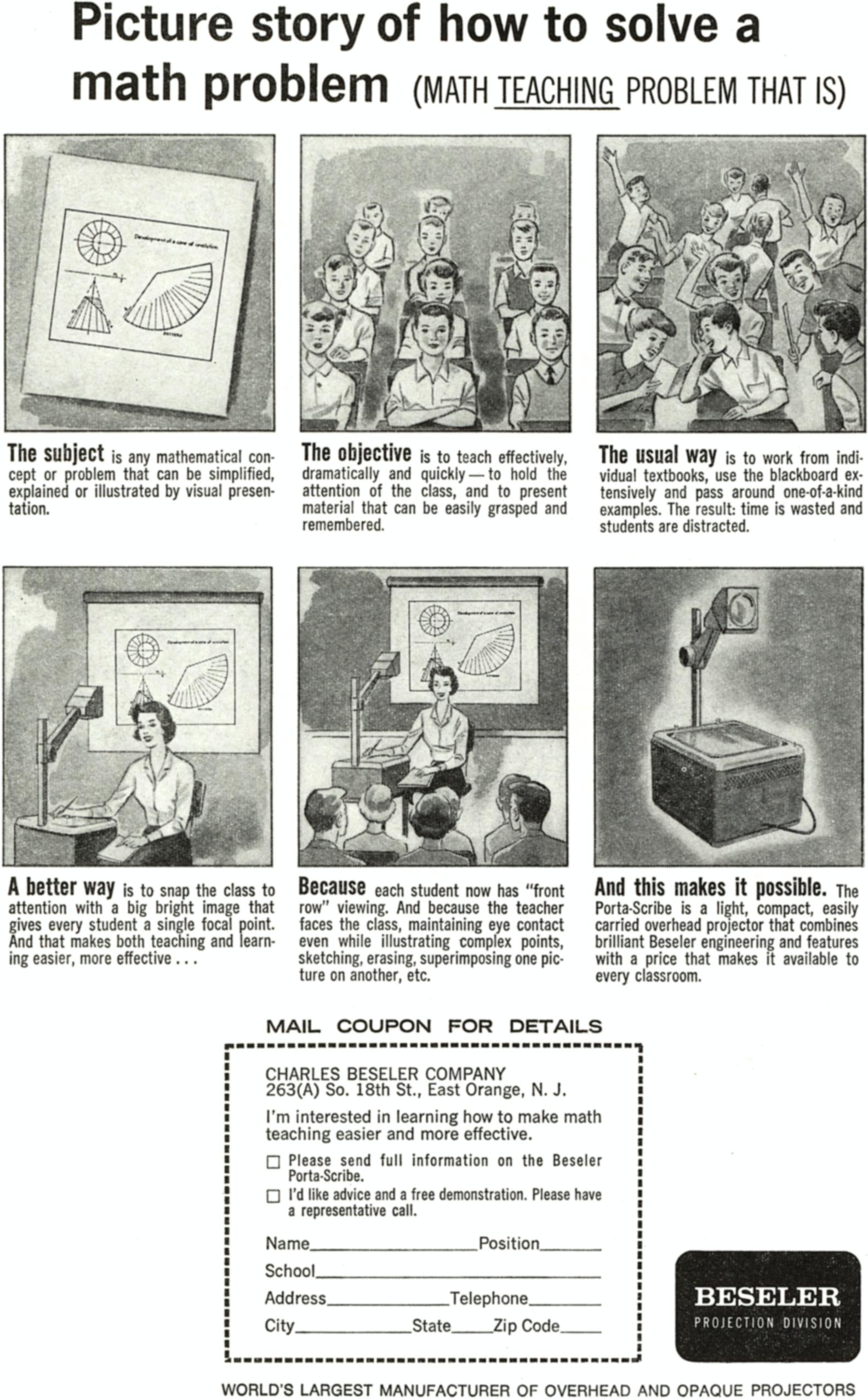
<li><a href="https://blogs.ubc.ca/etec540sept13/files/2013/10/Picture-story-of-how-to-solve-a-math-problem1.jpg">A delightful OHP ad</a></li>


<li>From <em>NPR</em>: <a href="https://www.npr.org/2007/09/30/14829195/sputnik-left-legacy-for-u-s-science-education">Sputnik Left Legacy for U.S. Science Education</a></li>
</ul>
						]]>
									</content>
			
					</entry>
			<entry>
			
			<author>
				<name>David Pierce</name>
			</author>
			
			<title type="html"><![CDATA[It’s a dream week for tech docs]]></title>
			<link rel="alternate" type="text/html" href="https://www.theverge.com/tech/1013367/best-tech-documentaries-musk-holmes-installer" />
			<id>https://www.theverge.com/?p=1013367</id>
			<updated>2026-10-16T20:39:31-04:00</updated>
			<published>2026-10-17T08:00:00-04:00</published>
			<category scheme="https://www.theverge.com" term="Gadgets" /><category scheme="https://www.theverge.com" term="Installer" /><category scheme="https://www.theverge.com" term="Streaming" /><category scheme="https://www.theverge.com" term="Tech" />
							<summary type="html"><![CDATA[Hi, friends! Welcome to Installer No. 148, your guide to the best and Verge-iest stuff in the world. (If you’re new here, welcome, hope you’re enjoying all your pumpkin-flavored everything, and also you can read all the old editions at the Installer homepage.) This week, I’ve been reading about Marc Andreessen and the future of [&#8230;]]]></summary>
			
							<content type="html">
											<![CDATA[

						
<figure>

<img alt="" data-caption="" data-portal-copyright="" data-has-syndication-rights="1" src="https://platform.theverge.com/wp-content/uploads/sites/2/2026/10/Installer-148.jpg?quality=90&#038;strip=all&#038;crop=0,0,100,100" />
	<figcaption>
		</figcaption>
</figure>
<p class="wp-block-paragraph">Hi, friends! Welcome to <em>Installer</em> No. 148, your guide to the best and <em>Verge</em>-iest stuff in the world. (If you’re new here, welcome, hope you’re enjoying all your pumpkin-flavored everything, and also you can read all the old editions at the <a href="https://www.theverge.com/installer-newsletter"><em>Installer</em> homepage</a>.)</p>

<p class="wp-block-paragraph">This week, I’ve been reading about <a href="https://www.bloomberg.com/news/features/2026-10-15/how-ai-crypto-and-dei-drove-marc-andreessen-to-maga"><strong>Marc Andreessen</strong></a> and <a href="https://www.quantamagazine.org/is-ai-the-end-of-math-as-we-know-it-20261005/"><strong>the future of math</strong></a> and <a href="https://www.gq.com/story/mike-tomlin-profile"><strong>Mike Tomlin</strong></a> and <a href="https://www.newyorker.com/magazine/2012/05/21/money-unlimited"><strong>Citizens United</strong></a>, reminiscing about <a href="https://www.youtube.com/watch?v=bKunNwD0uT8"><strong>the heyday of MySpace</strong></a>, sending <a href="https://www.theatlantic.com/magazine/2026/11/text-communication-social-obligation/688696/?gift=-pzApl_qRpBxCFP0g-J3xFKl80o5mHEBBnsVBWZ8Wgw"><strong>this article</strong></a> to everyone as an apology for my bad texting, listening to the Pet Shop Boys’ <a href="https://www.petshopboys.co.uk/news/2026-10-09/a-man-from-the-future-4"><strong>new Alan Turing album</strong></a> and <a href="https://www.youtube.com/watch?v=b-jsSfh0a9M"><strong>Dwarkesh Patel’s thoughts on AI</strong></a>, barely keeping myself from preordering an <a href="https://apple.sjv.io/c/482924/435031/7613?u=https%3A%2F%2Fwww.apple.com%2Fiphone-duo"><strong>iPhone Duo</strong></a>, asking a lot of questions about that <a href="https://www.youtube.com/watch?v=qt5p-_tE8d0"><strong>“flying” Tesla Roadster</strong></a>, and endlessly shopping for tripods to hold my phone for social videos. I have thought way too much about tripods this week.</p>

<p class="wp-block-paragraph">I also have for you a couple of huge new tech docs and a whole bunch of gadgets worth a look. Gadget season, baby! Let’s go.</p>

<p class="wp-block-paragraph">(As always, the best part of <em>Installer</em> is your ideas and tips. What are you watching / reading / listening to / playing / throwing in the trunk this week? Tell me everything: <a href="mailto:installer@theverge.com">installer@theverge.com</a>. And if you know someone else who might enjoy <em>Installer</em>, forward it to them and tell them to <a href="https://www.theverge.com/subscribe">subscribe here</a>.)</p>

<hr class="wp-block-separator has-alpha-channel-opacity" />

<h2 class="wp-block-heading">The Drop</h2>

<ul class="wp-block-list">
<li><a href="https://www.themoviedb.org/movie/1765072-you-can-see-everything?language=en-US"><strong><em>You Can See Everything</em></strong></a><strong>.</strong> I can’t remember the last time I was so excited about a documentary (especially a three-hour one). The pairing of Elizabeth Holmes and Nathan Fielder, the shocking level of access, the incredible meta-ness of the whole project. I’ll be seeing this the first minute I can. Oh, and after you watch the doc, watch <a href="https://www.youtube.com/watch?v=Lc06dK-JiAY"><strong>Josh Johnson’s hourlong set</strong></a> on all things Elizabeth Holmes. Glorious.</li>


<li><a href="https://www.themoviedb.org/movie/1096228-musk?language=en-US"><strong><em>Musk</em></strong></a><strong>.</strong> And here’s four more hours of tech doc! The reviews here are also spectacular, and even if you’ve been following the news the last decade or so, I suspect seeing it all in a row at once is going to be an experience.</li>


<li><a href="https://apple.sjv.io/c/482924/435031/7613?u=https%3A%2F%2Fwww.apple.com%2Fapple-homeview"><strong>The Apple HomeView</strong></a><strong>.</strong> I keep staring at the buy button on this new $299 home hub. I’m not sure what I need it for, really — my very basic smart home is working just fine — but there’s something almost old-school about the idea of this as a sort of family computer. I’m certainly in the market for fewer reasons to look at my phone.</li>


<li><a href="https://apple.sjv.io/c/482924/435031/7613?u=https%3A%2F%2Fwww.apple.com%2Fshop%2Fproduct%2Fmlfc4am%2Fa%2Fsiri-remote"><strong>The new Siri Remote</strong></a><strong>.</strong> I cannot in good conscience recommend a $300 Apple TV, but I can totally tell you to drop $60 on the new Find My-enabled remote! I mean, wait until you lose your existing one first. But you will. These remotes are impossible.</li>


<li><a href="https://www.fairphone.com/fairbuds-2"><strong>The Fairphone Fairbuds 2</strong></a><strong>.</strong> I’ve come to like both Fairphone’s minimalist aesthetic and its emphasis on repairability, and the fact that it gets both into a lighter, smaller, longer-lasting, cheaper-than-AirPods <a href="https://www.theverge.com/tech/1010906/fairphone-fairbuds-2-price-release-audio-repairability">package</a> is pretty exciting.</li>


<li><a href="https://www.xbox.com/en-US/accessories/controllers/xbox-nano-controller"><strong>The Xbox Nano Controller</strong></a><strong>.</strong> Look at this little guy! A pocket-sized game controller comes in handy more often than you think (makes the waiting room a <em>lot</em> more fun), and this one has all the buttons you’d expect for Xbox and other games. If the battery life is good, this one’s gonna be a winner.</li>


<li><a href="https://store.google.com/us/product/google_fitbit_edge?hl=en-US"><strong>The Fitbit Edge.</strong></a> I’ve been using a <a href="https://store.google.com/product/google_fitbit_air?hl=en-US"><strong>Fitbit Air</strong></a> for a while, and I like it a lot, but I <em>do</em> miss having a fitness tracker that also told me the time. This one does that, plus <a href="https://www.theverge.com/gadgets/1008410/fitbit-edge-price-battery-specs-fitness-tracker&apos;">a little more</a> workout and biometric tracking. It’s not the handsomest wristwear I’ve ever seen, but it is very Fitbit.</li>


<li><a href="https://us.nothing.tech/products/cmf-speaker-s"><strong>The CMF Speaker S</strong></a><strong>.</strong> I am a sucker for a cool Bluetooth speaker, and these <a href="https://www.theverge.com/tech/1008191/nothing-cmf-speaker-m-s-series-bluetooth-design-customize">futuristic milk carton-looking devices</a> are <em>fabulous</em>. I bought one of the small ones immediately, and I’m already debating a second to build out the stereo pair. More companies should make speakers that look good!</li>


<li><a href="https://www.eink.com/brand/detail/Kaleido"><strong>E Ink Kaleido 4</strong></a><strong>.</strong> This isn’t so much a specific gadget as it is good news for a whole category of gadgets: We have <a href="https://www.theverge.com/tech/1011384/e-ink-paper-color-kaleido-4-screen-upgrade-gamut-contrast-brightness">a new version</a> of the color E Ink panel found in lots of devices, with promises of both better colors and better performance. Kaleido has let down a lot of devices, but I’m excited to see what comes of this.</li>
</ul>

<hr class="wp-block-separator has-alpha-channel-opacity" />

<h2 class="wp-block-heading">Screen share</h2>

<p class="wp-block-paragraph">I’ve been reading <a href="https://kevinroose.com/"><strong>Kevin Roose</strong></a>’s new book, <a href="https://theagichronicles.com/"><strong><em>The AGI Chronicles</em></strong></a>, this week, and I truly cannot recommend it enough. We sometimes make fun of Kevin for loving (and being loved by) AI too much, but this book is fabulously reported, has taught me a ton, and makes so many things about the AI industry make a lot more sense.</p>

<p class="wp-block-paragraph">And Kevin’s not done! He and (friend of <em>Installer</em>) Casey Newton are getting ready to launch their new show, <a href="https://machinegods.fm/"><strong><em>Machine Gods</em></strong></a>, sometime next week. (If you were a <em>Hard Fork</em> fan, you’re gonna need to be listening to this one.) So I figured now was a good time to see how Kevin gets it all done — and whether he’s just Claude Code-d himself out of existence altogether. Have I even been texting with the real Kevin this week? WHO KNOWS.</p>

<p class="wp-block-paragraph">Here’s Kevin’s homescreen, plus some info on the apps he uses and why:</p>
<img src="https://platform.theverge.com/wp-content/uploads/sites/2/2026/10/Kevin-Roose-homescreen.jpeg?quality=90&amp;strip=all&amp;crop=0,0,100,100" alt="" title="" data-has-syndication-rights="1" data-caption="" data-portal-copyright="" />
<p class="wp-block-paragraph"><strong>The phone:</strong> iPhone 15 Pro (barely works, battery life is a joke, storage is full, but I&#8217;m holding out until I can preorder the Duo and become a new man).</p>

<p class="wp-block-paragraph"><strong>The wallpaper:</strong> A photo of my son fishing at the Russian River.</p>

<p class="wp-block-paragraph"><strong>The apps:</strong> Voice Memos, WhatsApp, Signal, Spotify, Google Maps, Safari, Day One, Brick, Stash, Superwhisper, Substack, Slack, Town, Apple Notes, Phone, Gmail, Messages.</p>

<p class="wp-block-paragraph">I&#8217;m a big dictation guy, I barely type anymore, and I use <a href="https://superwhisper.com/"><strong>Superwhisper</strong></a> and Voice Memos for everything. I vibe-coded a Pocket replacement called <a href="https://kevinroose.com/stash/"><strong>Stash</strong></a> that is still a delight many months later. (Building your own apps is so fun!) And I&#8217;m running a swarm of AI agents that includes Skynet (my <a href="https://chatgpt.com/features/dots/"><strong>ChatGPT Dot</strong></a>, which I use mostly for personal tasks), Hootie (my work agent, which runs on an app called <a href="https://www.town.com/"><strong>Town</strong></a> that Casey got me into), and Nancy (my <a href="https://muse.ai"><strong>Muse</strong></a> agent, who trades Kalshi on my behalf and has lost me $41 to date).</p>

<p class="wp-block-paragraph">I have a “red flags” app folder for social media and everything else I know is rotting my brain, a “green flags” folder for things that feel vaguely enriching, and an AI folder for all of my silly little bots.</p>

<p class="wp-block-paragraph"><em>I also asked Kevin to share a few things he’s into right now. Here’s what he sent back:</em></p>

<ul class="wp-block-list">
<li>I&#8217;m hopelessly addicted to <a href="https://www.playbalatro.com/"><strong><em>Balatro</em></strong></a>, a poker roguelike game that Casey got me into. (I will never forgive him for this.)</li>


<li>We&#8217;re starting a new, YouTube-first podcast, so I&#8217;m watching a lot of popular YouTube shows like <a href="https://www.youtube.com/@newheightshow"><strong><em>New Heights</em></strong></a> and <a href="https://www.youtube.com/channel/UC_-hYjoNe4PJNFa9iZ4lraA"><strong><em>Good Work</em></strong></a> to get ideas.</li>


<li>For fun, I usually stick with my hobby channels: <a href="https://www.youtube.com/channel/UC0k_--YLuTNuDvq1Dw4zHmw"><strong><em>Served</em></strong></a> (a tennis podcast hosted by Andy Roddick) and <a href="https://www.youtube.com/channel/UCLnar-aS8iHa2ldj1w_pgJQ"><strong>Roffle Lite</strong></a> (a <em>Balatro</em> streamer whose videos I sometimes fall asleep to), plus some stuff my son likes (<a href="https://www.youtube.com/channel/UCY1kMZp36IQSyNx_9h4mpCg"><strong>Mark Rober</strong></a>, <a href="https://www.themoviedb.org/tv/82728-bluey"><strong><em>Bluey</em></strong></a>, <a href="https://us.yotoplay.com/"><strong>Yoto stories</strong></a>) that I&#8217;ve also gotten into.</li>


<li>My favorite new app right now is <a href="https://labs.google/dreambeans"><strong>Dreambeans</strong></a>, a truly demented Google Labs app that sends AI-generated illustrations of personalized suggestions for things to do every day. I&#8217;ll open it up and it&#8217;s like, “Today you could go birdwatching at Point Reyes” and it&#8217;s just a stylized cartoon of me looking at a heron through binoculars. I don&#8217;t think people know Dreambeans exists but I love it and am preemptively sad for 6 months from now when Google shuts it down.</li>
</ul>

<hr class="wp-block-separator has-alpha-channel-opacity" />

<h2 class="wp-block-heading">Crowdsourced</h2>

<p class="wp-block-paragraph"><em>Here’s what the</em> Installer <em>community is into this week. I want to know what you’re into right now as well! Email</em> <a href="mailto:installer@theverge.com"><em>installer@theverge.com</em></a> <em>or message me on Signal —&nbsp;@davidpierce.11 — with your recommendations for anything and everything, and we’ll feature some of our favorites here every week. For even more great recommendations, check out the replies to</em> <a href="https://www.threads.com/share/P1m8QiJD0/"><em>this post on Threads</em></a> <em>and</em> <a href="https://bsky.app/profile/davidpierce.xyz/post/3mxwwacpfx22l"><em>this post on Bluesky</em></a><em>.</em></p>

<p class="wp-block-paragraph">“I&#8217;ve been using the markdown writing app, <a href="https://useem.app/"><strong>Em</strong></a>. I&#8217;m a longtime fan of iA Writer, but this plays so nicely with Ghost that my head has been turned.” — Chris</p>

<p class="wp-block-paragraph">“Just got my <a href="https://www.bose.com/p/earbuds/bose-noise-cancelling-wired-earbuds/NCWEARB-HEADPHONEIN.html?dwvar_NCWEARB-HEADPHONEIN_color=BLACK&amp;quantity=1"><strong>Bose Wired Earbuds</strong></a>, and I haven&#8217;t felt this excited and happy for a pair of earbuds since AirPods.” — Sai</p>

<p class="wp-block-paragraph">“I&#8217;ve been liking the app <a href="https://shelfandstory.com"><strong>Shelf &amp; Story</strong></a> for finding good books for my kids. Goodreads never quite cut it for me for that.” — Martha</p>

<p class="wp-block-paragraph">“Made by the founder of TV Time, <a href="https://bingers.app/"><strong>Bingers</strong></a> is my new favorite media tracker. Lots of really neat features (like easily updating dates and automatically populating a watchlist). Still can be improved but it&#8217;s off to a great start and is the first thing I reach for over Letterboxd these days.” —&nbsp;pegasusisme</p>

<p class="wp-block-paragraph">“Just finished the most recent season of <a href="https://www.youtube.com/c/jetlagthegame"><strong><em>Jet Lag: The Game</em></strong></a>. Probably their best one yet. A fantastic jumping on point for anyone new to it.” —&nbsp;Shane</p>

<p class="wp-block-paragraph">“<a href="https://www.themoviedb.org/tv/288673-carrie"><strong><em>Carrie</em></strong></a>, as soon as my internet provider resolves the outage affecting my area.” — Kev</p>

<p class="wp-block-paragraph">“Doing my annual listen to <a href="https://www.audible.com/pd/Snow-Crash-Audiobook/B002UUKWCY"><strong><em>Snow Crash</em></strong></a> — very much worth picking up in current times for anybody who has or hasn’t had the pleasure (Jonathan David is a PLEASURE to listen to).” —&nbsp;Jonathan</p>

<p class="wp-block-paragraph">“Still playing <strong><em></em></strong><a href="https://www.nintendo.com/us/store/products/fire-emblem-fortunes-weave-switch-2/?slug=fire-emblem-fortunes-weave-switch-2"><strong><em>Fire Emblem: Fortune&#8217;s Weave</em></strong></a>. Completed my first path. Just in time for the expansion pass to get announced.” — Connor</p>

<p class="wp-block-paragraph">“I’ve been really hooked on small roguelikes, like the city-builder meets <em>Balatro</em> in <a href="https://store.steampowered.com/app/4075620/Combolands_Roguelike_Citybuilder/"><strong><em>Combolands</em></strong></a> and the same twist but billiards in <a href="https://ultrapoolgame.com/"><strong><em>Ultrapool</em></strong></a>. I’ve been playing them on the Steam Deck which is good with some mouse tweaks, but you need to be comfy with the trackpads.” — Scott</p>

<hr class="wp-block-separator has-alpha-channel-opacity" />

<h2 class="wp-block-heading">Signing off</h2>

<p class="wp-block-paragraph">I mentioned last week that I’ve switched notes app, this time to <a href="https://capacities.io/"><strong>Capacities</strong></a>. Again. A few of you asked what finally clicked for me, and the answer is really simple: Capacities has this concept of “objects” instead of “notes,” which treats everything you save as a discrete type of thing. Images get treated and categorized one way; PDFs another; text notes another. Everything lives on its own, but is also organized by tags, dates, and however else you want. Getting this setup right is a <em>lot</em> of work, because you have to create and tune each object the way you want, but I spent an afternoon watching football and entering metadata and suddenly I can find things in my notes app again.</p>

<p class="wp-block-paragraph">This system won’t be for everybody — even at its best it’s pretty fiddly — but if you do wind up mucking around in Capacities, stare long and hard at <a href="https://docs.capacities.io/tutorials/creating-new-objects">this page in the documentation</a> first. It’ll help.</p>

<p class="wp-block-paragraph">See you next week!</p>
						]]>
									</content>
			
					</entry>
			<entry>
			
			<author>
				<name>David Pierce</name>
			</author>
			
			<title type="html"><![CDATA[Apple&#8217;s HomeView has an app problem]]></title>
			<link rel="alternate" type="text/html" href="https://www.theverge.com/podcast/1012911/apple-homeview-apps-carplay-vergecast" />
			<id>https://www.theverge.com/?p=1012911</id>
			<updated>2026-10-16T11:38:17-04:00</updated>
			<published>2026-10-16T11:38:17-04:00</published>
			<category scheme="https://www.theverge.com" term="Apple" /><category scheme="https://www.theverge.com" term="Gadgets" /><category scheme="https://www.theverge.com" term="Podcasts" /><category scheme="https://www.theverge.com" term="Tech" /><category scheme="https://www.theverge.com" term="Vergecast" />
							<summary type="html"><![CDATA[It’s been a couple of days since Apple’s big smart home announcement, and we have some more information — and a bunch of new questions — about the Apple HomeView. The device has plenty of computing oomph, is always connected to power, and looks like a perfect place to run a bunch of apps. And [&#8230;]]]></summary>
			
							<content type="html">
											<![CDATA[

						
<figure>

<img alt="" data-caption="" data-portal-copyright="Image: Alex Parkin / The Verge" data-has-syndication-rights="1" src="https://platform.theverge.com/wp-content/uploads/sites/2/2026/10/VRG_VST_101626_YTB.jpg?quality=90&#038;strip=all&#038;crop=0,0,100,100" />
	<figcaption>
		</figcaption>
</figure>
<p class="wp-block-paragraph">It’s been a couple of days since Apple’s big smart home announcement, and we have some more information — and a bunch of new questions — about the Apple HomeView. The device has plenty of computing oomph, is always connected to power, and looks like a perfect place to run a bunch of apps. And yet the HomeView is <a href="https://www.theverge.com/tech/1011062/apple-homeview-airplay-apps-streaming">relying almost entirely on CarPlay</a>. What gives here?</p>

<p class="wp-block-paragraph">On <a href="https://pod.link/vergecast">this episode of <em>The Vergecast</em></a>, David and Nilay try to make sense of the HomeView’s app situation, and why Apple would choose not to make its home hub into its own app platform. After that, they talk about <a href="https://www.theverge.com/ai-artificial-intelligence/1009862/google-releases-gemini-4-argon">the latest Gemini model</a> and whether <a href="https://www.theverge.com/ai-artificial-intelligence/1011311/the-ai-race-is-back-on">building the best model</a> matters if you can&#8217;t build the best products around it. They then debate the merits of <a href="https://daringfireball.net/2026/10/x_once_again_marks_the_spot">returning to X</a>, why none of the supposed Twitter replacements worked, the latest in Brendan Carr nonsense, and much more.</p>

<iframe loading="lazy" frameborder="0" height="200" src="https://playlist.megaphone.fm?e=VMP8399712454" width="100%"></iframe>

<p class="wp-block-paragraph"><a href="https://www.youtube.com/playlist?list=PL39u5ZEfYDEO5PaNRWyqloGY6zzJ1fjBa"><strong>Watch</strong></a> <strong>|</strong> <a href="https://bit.ly/3hkwRl2"><strong>Listen</strong></a> <strong>|</strong> <a href="https://www.theverge.com/bulletin/795051/verge-podcast-ad-free-set-up-how-to"><strong>Get ad-free</strong></a></p>

<p class="wp-block-paragraph">In case you missed it this week: We also talked about the rest of the <a href="https://www.theverge.com/podcast/1010286/vergecast-homeview-apple-smart-home">HomeView launch news</a>, the <a href="https://www.theverge.com/podcast/1011447/music-ai-slip-scam-vergecast">first big AI slop case</a>, and how to live in <a href="https://www.theverge.com/podcast/1012419/meta-glasses-cameras-recording-vergecast">a world filled with recording devices</a>. And we want to hear all your thoughts about all of it! Call the Vergecast Hotline at 866-VERGE11, send us an email at vergecast@theverge.com, and tell us everything that’s on your mind. And make sure you subscribe so you don’t miss an episode!</p>
						]]>
									</content>
			
					</entry>
			<entry>
			
			<author>
				<name>David Pierce</name>
			</author>
			
			<title type="html"><![CDATA[The Alexa Tablet 12 Pro is almost the Android tablet we needed]]></title>
			<link rel="alternate" type="text/html" href="https://www.theverge.com/tech/1010780/alexa-tablet-12-pro-review" />
			<id>https://www.theverge.com/?p=1010780</id>
			<updated>2026-10-14T12:29:45-04:00</updated>
			<published>2026-10-14T09:00:00-04:00</published>
			<category scheme="https://www.theverge.com" term="Amazon" /><category scheme="https://www.theverge.com" term="Amazon Alexa" /><category scheme="https://www.theverge.com" term="Reviews" /><category scheme="https://www.theverge.com" term="Tablet Reviews" /><category scheme="https://www.theverge.com" term="Tech" />
							<summary type="html"><![CDATA[We have to talk about this screen. It’s the first thing you notice, and maybe the only thing that matters, about the Alexa Tablet 12 Pro. It’s a 12-inch, 2800 x 1840 panel with a new technology Amazon calls “Nanomatte” that is meant to decrease glare and increase the feeling that you can reach out [&#8230;]]]></summary>
			
							<content type="html">
											<![CDATA[

						
<figure>

<img alt="A photo of a tablet on a table, in a keyboard case." data-caption="The screen looks good no matter what’s on it. Star Wars helps, though. | Photo: David Pierce / The Verge" data-portal-copyright="Photo: David Pierce / The Verge" data-has-syndication-rights="1" src="https://platform.theverge.com/wp-content/uploads/sites/2/2026/10/Alexa-Tablet-hero.jpg?quality=90&#038;strip=all&#038;crop=0,0,100,100" />
	<figcaption>
	The screen looks good no matter what’s on it. Star Wars helps, though. | Photo: David Pierce / The Verge	</figcaption>
</figure>
<p class="has-drop-cap wp-block-paragraph">We have to talk about this screen. It’s the first thing you notice, and maybe the only thing that matters, about the <a href="https://www.amazon.com/dp/B0DT25J8W8">Alexa Tablet 12 Pro</a>. It’s a 12-inch, 2800 x 1840 panel with a new technology Amazon calls “Nanomatte” that is meant to decrease glare and increase the feeling that you can reach out and touch the things you see onscreen. When Amazon set out to build the best tablet the company has ever shipped, it started with this screen.</p>

<p class="wp-block-paragraph">The $549.99 device I’ve been testing is one of four new models in the Alexa Tablet lineup, which ranges from a $229.99 8-inch model up to a $679.99 12 Pro with this Nanomatte coating and some extra RAM you don’t really need. The pitch for all those devices is the same: They’re well-made, midrange tablets that can access the full universe of Android apps through the Play Store and come with a whole bunch of Amazon bloatware whether you want it or not. I haven’t tested those other devices, but I’m glad they exist —&nbsp;cheap, good Android tablets are too hard to come by.</p>
<div class="product-block"><h3>Amazon Alexa Tablet 12 Pro</h3>
<figure class="product-image"><img loading="lazy" width="300" height="225" src="https://platform.theverge.com/wp-content/uploads/sites/2/2026/10/Alexa-Tablet.jpg?w=300" class="attachment-medium size-medium" alt="A photo of an Alexa Tablet with the keyboard case and stylus." /></figure>
<div class="product-scores"><h4>Score: 6</h4><table class="product-pros-cons"><thead><tr><th>Pros</th><th>Cons</th></tr></thead><tbody><tr><td><ul><li>Screen is gorgeous</li><li>Android apps!</li><li>Nice design and build quality</li></ul></td><td><ul><li>Amazon bloatware everywhere</li><li>Alexa Plus isn’t great</li><li>Some middling specs</li></ul></td></tr></tbody></table></div>
<h3>Where to Buy:</h3><ul><li><a href="https://www.amazon.com/dp/B0FMS8C99W"> $549.99 at <strong>Amazon</strong></a></li></ul></div>
<p class="wp-block-paragraph">But the Nanomatte. The Nanomatte! The etching on the display, which Amazon says it partnered with Corning to do at a sub-pixel level to reduce glare without causing the slight rainbow-shimmering effect you can get on other matte screens, absolutely does its job. When I use my iPad outdoors, I can often see what’s behind me like I’m staring into a mirror; the 12 Pro reflects only a small sheen of light, and does it without losing any sharpness. The viewing angles are incredible, too. I’d like the display to be a little brighter, but since the main reason to crank the brightness is to fight glare, it hasn’t really been a problem.</p>

<p class="wp-block-paragraph">The screen is not perfect. The anti-glare texture gives the Alexa Tablet a bit of shimmer, especially when you&#8217;re looking at light text on a black background. And the iPad&#8217;s blacks are still blacker; watching a movie, the letterboxes above and below are still slightly lit on the Alexa Tablet’s LCD, and they&#8217;re just flat-out off on the iPad’s OLED panel. Some of this you can fix: The 12 Pro has specific modes that automatically tweak tone and color to make reading more pleasant, and you can even control the overall picture through a few presets like the ones you’d find on your TV. My review unit came with “Boosted” mode turned on, which made every color just a smidge too colorful. I turned it to “Natural” and immediately liked the picture better.</p>
<img src="https://platform.theverge.com/wp-content/uploads/sites/2/2026/10/Alexa-Tablet-reading.jpg?quality=90&amp;strip=all&amp;crop=0,0,100,100" alt="An Alexa Tablet propped up on a table, showing a page from a book." title="An Alexa Tablet propped up on a table, showing a page from a book." data-has-syndication-rights="1" data-caption="This is as nice a reading tablet as you’ll find anywhere. | Photo: David Pierce / The Verge" data-portal-copyright="Photo: David Pierce / The Verge" />
<p class="wp-block-paragraph">I’m not sure this screen counts as some revolution in display technology, but then again, I did reflexively say “whoa” the first second I turned it on, and all that was showing was the Amazon logo. I like this display for everything. The 120Hz refresh rate looks great when running <em>Star Wars: Galactic Racer</em>, and the 3:2 aspect ratio feels right for web browsing and side-by-side work. The more muted display modes even make reading more pleasant than your average giant screen, though it’s lame that they only work in the Kindle app. After a few days of using the tablet indoors and out, I prefer the 12 Pro’s screen to any iPad I’ve tried. (Unfortunately, I don’t have an iPad Pro with the nano-texture glass to compare it to, but that’s a $2,200 tablet. I doubt anyone’s debating between the two.)</p>

<p class="wp-block-paragraph">All that display tech in a $549.99 device requires tradeoffs basically everywhere else, and Amazon makes lots of them. The MediaTek Dimensity 8400 processor benchmarks somewhere between a flagship high-end Android phone from last year and a flagship phone from two years ago, and gets absolutely lapped by practically every current iPad. In one graphics-heavy benchmark, the current <a href="https://www.theverge.com/tech/803105/apple-ipad-pro-2025-review-fast-faster-fastest">13-inch iPad Pro</a> scored about nine times higher.</p>

<p class="wp-block-paragraph">I&#8217;d like more horsepower here, but in my day-to-day use there&#8217;s plenty of power in this tablet. In several days of playing games, doing work, and watching a lot of NFL RedZone, the only slowness I&#8217;ve detected has been little niggling things in the Android experience. The app switcher sometimes stutters when it loads. I suppose I worry a little about how this tablet will age, given that it doesn&#8217;t share the iPad&#8217;s preposterous oversupply of processing power, but for now it&#8217;s fine.</p>

<p class="wp-block-paragraph">Come to think of it, &#8220;it&#8217;s fine&#8221; explains most of the 12 Pro&#8217;s hardware. The four speakers are a little thin and muddy, but loud and clear enough. The cameras wash out some colors, but they work for video calls. The $149.99 keyboard case is nice to type on, but a little awkward to detach and manipulate. The $89.99 pen is smooth and responsive, but not many Android apps support a stylus. The battery lasts me about eight hours of screen time, which is a little less than I’d like and less than Amazon advertises. Nothing here is a deal-breaker, it’s just a lot of <em>fine</em>.</p>
<img src="https://platform.theverge.com/wp-content/uploads/sites/2/2026/10/Alexa-Tablet-Android.jpg?quality=90&amp;strip=all&amp;crop=0,0,100,100" alt="A tablet on a table, displaying the Play Store." title="A tablet on a table, displaying the Play Store." data-has-syndication-rights="1" data-caption="The Play Store immediately makes this an improvement on Fire tablets. | Photo: David Pierce / The Verge" data-portal-copyright="Photo: David Pierce / The Verge" />
<p class="wp-block-paragraph">The software, on the other hand, is all extremes. The great news: The Alexa Tablets run full Android, not the weird off-brand operating system Amazon’s Fire tablets have used for the last 15 years. That means you get all the apps in the Play Store, a vastly improved interface, and access to things like Google’s Gemini assistant. All by itself, that change makes these the most functional Amazon tablets ever.</p>

<p class="wp-block-paragraph">Unfortunately, Amazon did to Android exactly what you’d fear — and maybe expect. It Amazon-ed the crap out of things. I’m fine with the slide-over panel to the left of the homescreen filled with content recommendations; the overlap of Alexa Tablet owners and Prime subscribers / Kindle readers is probably pretty high, and at least that screen isn&#8217;t staring you in the face every time you unlock your tablet. I can even live with Amazon preloading its own browser, photos, and music apps, none of which are better than their competition. But it is frankly outrageous that Amazon thinks it can get away with adding two separate, non-removable homescreen widgets that serve no purpose other than advertising Amazon&#8217;s products.</p>

<p class="wp-block-paragraph">If you’re going to say you “<a href="https://www.aboutamazon.com/about-us/leadership-principles">obsess over customers</a>,” you don’t get to borrow the top left corner of my homescreen and then use that space to show me an ad vaguely offering to &#8220;Cook with premium ingredients&#8221; that launches an also unhideable Alexa chat window in the bottom right corner of my homescreen.</p>

<p class="wp-block-paragraph">Luckily, this is Android, and installing a new launcher takes 30 seconds. If you buy an Alexa Tablet, I recommend doing so immediately.</p>
<img src="https://platform.theverge.com/wp-content/uploads/sites/2/2026/10/Alexa-Tablet-Alexa.jpg?quality=90&amp;strip=all&amp;crop=0,0,100,100" alt="A photo of a tablet with a widget open showing an Alexa conversation." title="A photo of a tablet with a widget open showing an Alexa conversation." data-has-syndication-rights="1" data-caption="&lt;p&gt;I do not need Alexa this front and center on my tablet.&lt;/p&gt;&lt;br&gt; | Photo: David Pierce / The Verge" data-portal-copyright="Photo: David Pierce / The Verge" />
<p class="wp-block-paragraph">I would be less annoyed by Alexa’s overbearing presence on this tablet if Alexa Plus were actually useful, which <a href="https://www.theverge.com/tech/1007565/amazon-alexa-plus-review-one-year-echo-show-dot-max">it mostly is not</a>. If you’re looking to buy whatever’s on your screen, Alexa’s your bot: You can invoke the assistant in any app, and it’ll almost always assume your goal is to shop for whatever you’re currently looking at. If you want, well, anything else, you’re probably out of luck. Almost a year after its launch, Alexa Plus is not a very good assistant. It’s slow, it gets lost in back-and-forth conversations, and it still doesn’t have enough access to my apps and data to be useful. You can switch to Gemini in the device’s settings, and you should.</p>

<p class="wp-block-paragraph">Once you de-Amazon the tablet, you’re left with a pretty useful Android device. And this is where the Alexa Tablet gets tricky to evaluate. I wouldn’t recommend using it as a primary computer, given the still sorry state of large-screen Android apps. (Between this and the ongoing <a href="https://www.theverge.com/tech/1008563/googlebook-software-impressions-thoughts-roundtable">Googlebook fiasco</a>, I really hope Google is learning a lesson about incentivizing developers to care about big screens and keyboards.) But between the Kindle-specific display mode, all the streaming and reading apps in the Play Store, and this terrific screen, this is immediately one of the best tablets-for-tablet-things you can buy.</p>

<p class="wp-block-paragraph">Realistically, you’re probably debating whether to buy the Alexa Tablet or an iPad. (Apologies to the Samsung Galaxy Tab shoppers out there, but this one’s a way better buy for almost everybody.) For the same $550 you’ll drop on the 12 Pro, you can get <a href="https://www.theverge.com/apple/636335/ipad-2025-11th-generation-review">a base-model iPad</a> with 256GB of storage. I’d probably tell you to buy the iPad; it has much better tablet software and much better big-screen apps, and Apple has a much better track record in tablets.</p>

<p class="wp-block-paragraph">And yet for the last few days, I’ve had an iPad and an Alexa Tablet sitting on my desk, and every time I want to watch or read something I’ve found myself gravitating to Amazon’s device. It is really nice to look at.</p>
						]]>
									</content>
			
					</entry>
			<entry>
			
			<author>
				<name>David Pierce</name>
			</author>
			
			<title type="html"><![CDATA[The techlash has gone Hollywood]]></title>
			<link rel="alternate" type="text/html" href="https://www.theverge.com/tech/1008836/social-reckoning-cupertino-techlash-installer" />
			<id>https://www.theverge.com/?p=1008836</id>
			<updated>2026-10-09T12:53:54-04:00</updated>
			<published>2026-10-10T08:00:00-04:00</published>
			<category scheme="https://www.theverge.com" term="Gadgets" /><category scheme="https://www.theverge.com" term="Installer" /><category scheme="https://www.theverge.com" term="Streaming" /><category scheme="https://www.theverge.com" term="Tech" />
							<summary type="html"><![CDATA[Hi, friends! Welcome to Installer No. 147, your guide to the best and Verge-iest stuff in the world. (If you’re new here, welcome, I missed you all, and also you can read all the old editions at the Installer homepage.)&#160; I’m back from parental leave! Part time, anyway. Thanks to everyone who sent well wishes [&#8230;]]]></summary>
			
							<content type="html">
											<![CDATA[

						
<figure>

<img alt="" data-caption="" data-portal-copyright="Image: David Pierce / The Verge" data-has-syndication-rights="1" src="https://platform.theverge.com/wp-content/uploads/sites/2/2026/10/Installer-147.jpg?quality=90&#038;strip=all&#038;crop=0,0,100,100" />
	<figcaption>
		</figcaption>
</figure>
<p class="wp-block-paragraph">Hi, friends! Welcome to <em>Installer</em> No. 147, your guide to the best and <em>Verge</em>-iest stuff in the world. (If you’re new here, welcome, I missed you all, and also you can read all the old editions at the <a href="https://www.theverge.com/installer-newsletter"><em>Installer</em> homepage</a>.)&nbsp;</p>

<p class="wp-block-paragraph">I’m back from parental leave! Part time, anyway. Thanks to everyone who sent well wishes and tips for managing three kids. I need ’em all. This week, I’ve been reading about <a href="https://thebaffler.com/outbursts/bad-manors-wagner"><strong>McMansions</strong></a> and <a href="https://www.mlive.com/business/2026/10/outmaneuvered-outmatched-and-outspent-how-data-centers-are-overwhelming-small-town-america.html"><strong>data centers</strong></a> and <a href="https://www.gq.com/story/sports-cards-gambling"><strong>sports cards</strong></a> <strong></strong>and <a href="https://www.wired.com/story/icann-top-level-domains-meow/"><strong>ICANN</strong></a>, trying to run my life on <a href="https://www.anrdoezrs.net/click-101881227-12839518?url=https%3A%2F%2Fwww.dell.com%2Fen-us%2Fshop%2Flaptop-computers%2Fspd%2Fxps13dx13267"><strong>the Dell XPS Googlebook</strong></a>, testing a new and <a href="https://www.amazon.com/dp/B0FXJ8VZ39?th=1&amp;linkCode=ll2&amp;tag=vergenewsletter-20&amp;linkId=d63c4a5c47d46b22793ba74dec5bc218&amp;language=en_US&amp;gaOptInStatus=true&amp;ref_=as_li_ss_tl"><strong>very purple Kindle</strong></a>, reinventing my whole note-taking system now that Google Docs can <a href="https://www.techrepublic.com/article/news-google-docs-vs-obsidian/"><strong>handle Markdown files</strong></a>, listening to episode after episode of <a href="https://www.nosuchthingasafish.com/"><strong><em>No Such Thing as a Fish</em></strong></a>, <em></em>and watching all of <a href="https://www.themoviedb.org/tv/136311-shrinking"><strong><em>Shrinking</em></strong></a> <em></em>between the hours of 1 and 5AM while feeding a baby. <em>&nbsp;</em>&nbsp;&nbsp;&nbsp;</p>

<p class="wp-block-paragraph">I also have for you the new Facebook movie, a tech-related procedural, a couple of great new gadgets, the <em>Star Wars</em> game that is going to destroy my productivity, a terrific book about the AI industry, and much more. Let’s do this.</p>

<p class="wp-block-paragraph">(As always, the best part of <em>Installer</em> is your ideas and tips. What have you been watching / reading / playing / listening to / putting in the air fryer this week? Tell me everything: <a href="mailto:installer@theverge.com">installer@theverge.com</a>. And if you know someone else who might enjoy <em>Installer</em>, forward it to them and tell them to <a href="https://www.theverge.com/subscribe">subscribe here</a>.)</p>

<hr class="wp-block-separator has-alpha-channel-opacity" />

<h2 class="wp-block-heading">The Drop</h2>

<ul class="wp-block-list">
<li><a href="https://www.themoviedb.org/movie/1281331-the-social-reckoning"><strong><em>The Social Reckoning</em></strong></a><strong>.</strong> My hopes were not super high for this movie, and the reaction so far suggests it’s good but a far cry from <em>The Social Network.</em> (Which I just watched recently, and absolutely still rips.) Still, Aaron Sorkin and Jeremy Strong will end up in the annals of Big Tech Movies, and I will not be missing this one.</li>


<li><a href="https://www.amazon.com/b?node=221942416011&amp;linkCode=ll2&amp;tag=vergenewsletter-20&amp;linkId=519718459c8f146000dd13bbabc20f6a&amp;language=en_US&amp;ref_=as_li_ss_tl"><strong>The Amazon Alexa Tablet 12 Pro</strong></a><strong>.</strong> For the first time ever, Amazon decided — and I know this might sound far-fetched — to just build an awesome tablet. And it seems it may have! There’s lots of testing to do, and I’m particularly curious about this high-end model with the fancy screen, but I’m hopeful this is the “iPad but cheaper” we’ve been waiting for. For <em>years. </em></li>


<li><a href="https://theagichronicles.com/"><strong><em>The AGI Chronicles</em></strong></a><strong>.</strong> However bizarre you think the AI industry is, I promise Kevin Roose’s book will convince you it’s even more so. Roose has been deep inside the AI labs for the last few years, and I think came out with the most important story in AI: how a few executives, and the relationships between them, somehow came to determine the future of everything.</li>


<li><a href="https://www.starwars.com/games-apps/star-wars-galactic-racer"><strong><em>Star Wars: Galactic Racer</em></strong></a><strong>.</strong> It’s a super high-fidelity <em>Star Wars</em> racing game in which you (eventually) get to <a href="https://www.theverge.com/entertainment/1002887/star-wars-galactic-racer-review">pilot a podracer</a>. That’s all I needed to hear! Oh, and if you’re a Prime subscriber, you can <a href="https://luna.amazon.com/game/star-wars-galactic-racer/B0HLN4GG5K"><strong>play it for free</strong></a> on Amazon’s Luna service.</li>


<li><a href="https://www.themoviedb.org/tv/303630-cupertino"><strong><em>Cupertino</em></strong></a><strong>.</strong> The folks who made <em>The Good Wife</em> made a show about technology, and it is <a href="https://www.theverge.com/entertainment/1007492/cupertino-cbs-tv-review">exactly what you think it is</a>. I kind of love it! What I’ve seen so far is pretty thoughtful about some complicated real-life legal stuff in tech and AI, and the procedural setup is frankly a nice break from all these miniseries and four-hour docs.</li>


<li><a href="https://www.microsoft.com/en-us/surface/devices/surface-laptop-ultra"><strong>The Surface Laptop Ultra</strong></a><strong>.</strong> Microsoft revealed all the details of its most impressive laptop, and while it’s expensive ($2,600!), it also looks and sounds fantastic. Microsoft is pushing the device’s AI capabilities, but this also looks like the uncompromising MacBook Pro competition a lot of Windows users might want. </li>


<li><a href="https://www.gearsofwar.com/en-us/games/gears-of-war-eday/"><strong><em>Gears of War: E-Day</em></strong></a><strong>.</strong> When it comes to raw, brutal combat, <em>Gears</em> doesn’t miss very often. This one also seems to deliver on story and exploration, which aren’t always the series’ strong points; a lot of people have been waiting for the origin-story title, and I’m thrilled the game pulls it off.</li>


<li><a href="https://wwnorton.com/books/9781324131656"><strong><em>Blockers</em></strong></a><strong>.</strong> Michael Lewis tells the story of Elon Musk and DOGE, and in particular of the government employees who tried to stop them from running roughshod over the federal government. I really enjoyed <a href="https://wwnorton.com/books/the-fifth-risk/"><strong><em>The Fifth Risk</em></strong></a><em>,</em> Lewis’ last book about the government, and I expect to like this one too.</li>
</ul>

<hr class="wp-block-separator has-alpha-channel-opacity" />

<h2 class="wp-block-heading">Screen share</h2>

<p class="wp-block-paragraph">One thing about parental leave is that it involves a lot of time with one hand free. Over the last seven weeks I’ve spent dozens, maybe hundreds of hours on the couch while a tiny potato of a baby sleeps or cries or farts on top of me. So what did I do with all that time? Goofed around on my phone, mostly. Too much Reddit, too much TikTok, mercifully at least a little reading and crosswording.</p>

<p class="wp-block-paragraph">I also redid my entire homescreen, because of course I did, and I figured I’d share. Here’s my current setup:</p>
<img src="https://platform.theverge.com/wp-content/uploads/sites/2/2026/10/David-Pierce-homescreen-2.jpeg?quality=90&amp;strip=all&amp;crop=0,0,100,100" alt="" title="" data-has-syndication-rights="1" data-caption="" data-portal-copyright="" />
<p class="wp-block-paragraph"><strong>The phone:</strong> iPhone 17. I have no desire to upgrade to the 18… but I find myself hopelessly lusting after a Duo. I must not give in.</p>

<p class="wp-block-paragraph"><strong>The wallpaper:</strong> Black. I am on an endless quest to make my phone less interesting to look at, and this helps. It also helps make my phone a little less blaring when I’m looking at it in the dark, which I do a lot these days.</p>

<p class="wp-block-paragraph"><strong>The apps:</strong> Unread, Instapaper, Google Maps, Capacities, Daygame, Flora, Phone, Pocket Casts, Spotify, Camera, Prism, Mimestream, Arc.</p>

<p class="wp-block-paragraph">A few things I want to mention here:</p>

<ul class="wp-block-list">
<li>The widgets at the top are <a href="https://readdle.com/calendars"><strong>Calendars</strong></a> and <a href="https://acmeweather.com/app"><strong>Acme Weather</strong></a>. Acme is a fabulous weather app, and I love the hourly widget; Calendars is, like, fine. I switch between it and Fantastical all the time. I don’t think I like any calendar app.</li>


<li>The only truly new things on my homescreen are <a href="https://harshitbeni.com/journal"><strong>Flora</strong></a> and <a href="https://prism.you/"><strong>Prism</strong></a>. Flora is a journaling app currently in TestFlight for Apple devices, and it is fabulous. It’s simple and straightforward, but also pulls in workout data, photos, and more to give a really cool snapshot of your day. Prism is a note-taking app that is as fast as texting yourself but with many more organizational powers. I have spent forever looking for a quick, transient way to jot stuff down and organize it later; Prism might be it.</li>


<li>In case you’re following my endless search for notes apps: I’m back on <a href="https://capacities.io/"><strong>Capacities</strong></a>, which finally clicked for me. It is a project to get the app fully customized, but it turns out to work exactly like my brain does.</li>


<li>I switched from <a href="https://read.readwise.io/"><strong>Readwise Reader</strong></a> to <a href="https://instapaper.com/"><strong>Instapaper</strong></a> because I recently bought a Kobo, and Instapaper is so nicely integrated into the device. I like the whole setup, but also the <a href="https://shop.boox.com/products/palma3"><strong>Boox Palma 3</strong></a> is coming, so my reading universe might be in for yet another overhaul soon.</li>


<li><a href="https://daygame.xyz/"><strong>Daygame</strong></a>, in the middle there, is a thing I built for myself to manage all the daily games I play — it’s just a page full of links to games, which open in various apps and tabs. I might try and spruce it up and share it more widely. Send games I should include!</li>
</ul>

<p class="wp-block-paragraph">Before I forget, a few more recommendations from my parental leave:</p>

<ul class="wp-block-list">
<li><a href="https://www.themoviedb.org/movie/1119449-good-luck-have-fun-don-t-die"><strong><em>Good Luck, Have Fun, Don’t Die</em></strong></a><strong>.</strong> Maybe the strangest movie I watched over the last couple of months, and certainly the one that made me think the most about tech and AI and the future we’re heading toward.</li>


<li><a href="https://www.themoviedb.org/movie/1340206-tuner?language=en-US"><strong><em>Tuner</em></strong></a><strong>.</strong> A movie about a piano tuner who falls into a world of safecracking. Nothing I say about this movie will make it sound compelling, but I promise: It’s great.</li>


<li><a href="https://www.themoviedb.org/tv/287238-furious?language=en-US"><strong><em>Furious</em></strong></a><strong>.</strong> One of the most intense, propulsive crime shows I’ve seen in forever. Could barely put it down.</li>


<li><a href="https://apps.apple.com/us/app/footnotes-notes-for-noticing/id6803869918"><strong>Footnotes</strong></a><strong>.</strong> A really cool (Apple-only) journaling and notes app, with emphasis on taking pictures and video right next to your notes. One of the most uniquely designed mobile apps I’ve ever used.</li>


<li><a href="https://www.spiderweb-security.com/podcastshuffle"><strong>Podcast Shuffle</strong></a><strong>.</strong> I had no idea I needed this app until I tried it. You just press a button, and it randomly plays an episode from whatever podcast or podcasts you’ve selected. I use it for falling asleep, I use it for long drives, I love not having to scroll just to get something playing.</li>
</ul>

<hr class="wp-block-separator has-alpha-channel-opacity" />

<h2 class="wp-block-heading">Crowdsourced</h2>

<p class="wp-block-paragraph"><em>Here’s what the</em> Installer <em>community is into this week. I want to know what you’re into right now as well! Email</em> <a href="mailto:installer@theverge.com"><em>installer@theverge.com</em></a> <em>or message me on Signal —&nbsp;@davidpierce.11 — with your recommendations for anything and everything, and we’ll feature some of our favorites here every week. For even more great recommendations, check out the replies to</em> <a href="https://www.threads.com/share/Hqy9ubsez/"><em>this post on Threads</em></a> <em>and</em> <a href="https://bsky.app/profile/davidpierce.xyz/post/3mxeqtwe4hk2n"><em>this post on Bluesky</em></a><em>.</em></p>

<p class="wp-block-paragraph">“Playing <a href="https://starcraft2.blizzard.com/en-us/"><strong><em>StarCraft II</em></strong></a> since the announcement of a new <em>StarCraft</em> in 2030. Just learned that macOS will drop support of Rosetta 2 in 2028 so no more <em>StarCraft</em> for Mac.” — Christian</p>

<p class="wp-block-paragraph">“I&#8217;m going on a 13-hour road trip, once again guided solely by an old-school Garmin dashboard-mounted GPS. (<a href="https://www.garmin.com/en-US/p/612620/"><strong>DriveSmart</strong></a> series; I forget what size.) I like that it&#8217;s a single-purpose device with no ads, no subscriptions, and that continues to get map updates.” —&nbsp;sringsmuth</p>

<p class="wp-block-paragraph">“The <a href="https://pod.link/1762447440/episode/cHJ4XzgwMTNfODkzYmIxOTAtMjdkOC00ZTYzLWJjMDYtYmY5ZmJjNzM3YTQ1"><strong>recent</strong> <strong><em>Hyperfixed</em></strong> <strong>podcast episode</strong></a> about the microwave popcorn button is one of the Verge-iest non <em>Verge</em> podcasts I&#8217;ve heard in a long time. A BUTTON IS A PROMISE.” — MrEnthusiasm</p>

<p class="wp-block-paragraph">“I recently finished playing <a href="https://www.playstation.com/en-us/games/marvels-wolverine/"><strong><em>Wolverine</em></strong></a> on PS5, and I’m blown away by its incredible story and graphics. Insomniac delivered on that unspoken promise of slashing and dashing through bad guys —&nbsp;it feels like a whole new level for the character and for fans of Wolverine.” —&nbsp;Josue</p>

<p class="wp-block-paragraph">“Just saw <a href="https://www.themoviedb.org/movie/1400837-other-mommy?language=en-US"><strong><em>Other Mommy</em></strong></a>. It&#8217;s like a fun amusement park ride in the form of a campy horror film.” — Kevin</p>

<p class="wp-block-paragraph">“I’m building a shed. The tech angle is learning new things using YouTube, online library books, and some AI reviews of local building code pdfs to check if I missed anything. I’m probably doing it all wrong, but that’s what the fire pit is for.” — Tim</p>

<p class="wp-block-paragraph">“I have fallen headfirst into retro gaming on a <a href="https://www.nintendo.com/en-gb/Hardware/Nintendo-3DS-Family/New-Nintendo-3DS-XL/New-Nintendo-3DS-XL-955921.html"><strong>Nintendo 3DS XL</strong></a>. The catalog of DS &amp; 3DS games is absolutely massive. Running on native, easily reparable hardware, it’s hard to beat in terms of performance and cost.&nbsp; Ok…back to <a href="https://www.nintendo.com/en-gb/Games/Nintendo-DS/Picross-3D-272244.html"><strong><em>Picross 3D</em></strong></a>.” — Jacob</p>

<p class="wp-block-paragraph">“The <a href="https://www.youtube.com/watch?v=JIMXEuT_ZAU"><strong>Ezra Klein interview</strong></a> with the ex-OpenAI guy and the <a href="https://www.youtube.com/watch?v=lnLDjXy2kRA"><strong>Jon Stewart interview</strong></a> with the other ex-OpenAI guy.” — Chung</p>

<p class="wp-block-paragraph">“I have been listening to <a href="https://www.themoviedb.org/tv/316992-world-war-ii-with-tom-hanks"><strong><em>World War II</em></strong></a> by Tom Hanks from the History Channel.” — Michael</p>

<hr class="wp-block-separator has-alpha-channel-opacity" />

<h2 class="wp-block-heading">Signing off</h2>

<p class="wp-block-paragraph">You might already know about the <a href="https://www.youtube.com/@HTXStudio"><strong>HTX Studio</strong></a> YouTube channel, but if you don’t, <em>trust me</em>, you need to check it out. It’s a team of makers and creators from China who are making some of the most innovative tech videos I’ve seen in years. I have watched <a href="https://www.youtube.com/watch?v=KvLWuK2TU-w"><strong>their video about AirDesk</strong></a> approximately 25 times, and I want that desk more every single time I see it. The channel is a bit over a year old, and I have yet to find an HTX video that isn’t worth the time — even <a href="https://www.youtube.com/watch?v=lLX9Ls7FUGs"><strong>the one about the cow</strong></a>.</p>

<p class="wp-block-paragraph">See you next week!</p>
						]]>
									</content>
			
					</entry>
			<entry>
			
			<author>
				<name>David Pierce</name>
			</author>
			
			<title type="html"><![CDATA[The AI is in the computer]]></title>
			<link rel="alternate" type="text/html" href="https://www.theverge.com/podcast/1008707/amazon-alexa-tablet-googlebooks-apple-vergecast" />
			<id>https://www.theverge.com/?p=1008707</id>
			<updated>2026-10-09T11:10:12-04:00</updated>
			<published>2026-10-09T11:10:12-04:00</published>
			<category scheme="https://www.theverge.com" term="Amazon" /><category scheme="https://www.theverge.com" term="Gadgets" /><category scheme="https://www.theverge.com" term="Microsoft" /><category scheme="https://www.theverge.com" term="Podcasts" /><category scheme="https://www.theverge.com" term="Tech" /><category scheme="https://www.theverge.com" term="Vergecast" />
							<summary type="html"><![CDATA[It’s gadget season, and a lot of companies are launching a lot of new products. But whether it’s Microsoft dropping a high-end laptop, Amazon shipping a fancy Android tablet, or Apple diving headlong into the smart home, the actual strategy appears to be almost always the same. All these companies believe AI assistants and agents [&#8230;]]]></summary>
			
							<content type="html">
											<![CDATA[

						
<figure>

<img alt="" data-caption="" data-portal-copyright="Image: Alex Parkin / The Verge" data-has-syndication-rights="1" src="https://platform.theverge.com/wp-content/uploads/sites/2/2026/10/VRG_VST_100926_Site.jpg?quality=90&#038;strip=all&#038;crop=0,0,100,100" />
	<figcaption>
		</figcaption>
</figure>
<p class="wp-block-paragraph">It’s gadget season, and a lot of companies are launching a lot of new products. But whether it’s Microsoft <a href="https://www.theverge.com/tech/1007147/microsoft-surface-laptop-ultra-windows-event-everything-announced">dropping a high-end laptop</a>, Amazon shipping <a href="https://www.theverge.com/tech/1007473/amazon-alexa-tablet-12-pro-nanomatte-hands-on">a fancy Android tablet</a>, or Apple <a href="https://www.theverge.com/news/1008039/apple-smart-home-event-october-13th">diving headlong</a> into the smart home, the actual strategy appears to be almost always the same. All these companies believe AI assistants and agents are the future of computing, and they’re building devices that put them front and center.</p>

<p class="wp-block-paragraph">On <a href="https://pod.link/vergecast">this episode of <em>The Vergecast,</em></a> David and Nilay dig into all this new hardware to figure out whether any of it has the right take on AI. (Or if “the AI should run the computer” is even the right idea in the first place.) They discuss <a href="https://www.theverge.com/tech/1007648/amazon-alexa-tablets-price-specs">Amazon’s ambitions</a> to be a maker of great hardware, Microsoft’s <a href="https://www.theverge.com/news/1006378/microsoft-surface-laptop-ultra-pricing-release-date">powerful new take on Surface</a>, and even whether <a href="https://www.theverge.com/tech/1005745/google-googlebook-android-laptops-dell-acer-asus-lenovo-hp-impressions">Googlebooks</a> can be the AI-centric future of laptops. </p>

<p class="wp-block-paragraph">After all the hardware talk, it’s time for Brendan Carr is a Dummy, some talk about the <a href="https://www.theverge.com/entertainment/1005480/paramount-warner-bros-discovey-merger-closed">Paramount / Warner acquisition</a> and what it means for the streaming landscape, the dream of “<a href="https://www.theverge.com/ai-artificial-intelligence/1007276/openai-chatgpt-intelligent-ui-gpt-6">intelligent UI</a>,” and more. </p>

<iframe loading="lazy" frameborder="0" height="200" src="https://playlist.megaphone.fm?e=VMP8833126862" width="100%"></iframe>

<p class="wp-block-paragraph"><a href="https://www.youtube.com/playlist?list=PL39u5ZEfYDEO5PaNRWyqloGY6zzJ1fjBa"><strong>Watch</strong></a> <strong>|</strong> <a href="https://bit.ly/3hkwRl2"><strong>Listen</strong></a> <strong>|</strong> <a href="https://www.theverge.com/bulletin/795051/verge-podcast-ad-free-set-up-how-to"><strong>Get ad-free</strong></a></p>

<p class="wp-block-paragraph">In case you missed it this week: We also talked about <a href="https://www.theverge.com/podcast/1005101/vergecast-vibe-coding-bear-lair">vibe-coded apps</a>, <a href="https://www.theverge.com/podcast/1006181/muse-dot-instinct-ai-agents-vergecast">our relationships with AI agents</a>, <a href="https://www.theverge.com/podcast/1007388/best-headphones-2026-vergecast">the state of the headphone market</a>, and <a href="https://www.theverge.com/podcast/1008390/alexa-plus-tablet-review-vergecast">lessons from a year of Alexa Plus</a>. And we want to hear all your thoughts about all of it! Call the Vergecast Hotline at 866-VERGE11, send us an email at vergecast@theverge.com, and tell us everything that’s on your mind. And make sure you subscribe so you don’t miss an episode!</p>

<p class="wp-block-paragraph">P.S., We’d love for you to vote for us in the Signal Awards! Thanks in advance.</p>

<ul class="wp-block-list">
<li><a href="https://vote.signalaward.com/PublicVoting#/2026/shows/genre/business" target="_blank" rel="noopener">Vote <em>Decoder</em>: Best Business Podcast</a></li>


<li><a href="https://vote.signalaward.com/PublicVoting#/2026/shows/genre/technology" target="_blank" rel="noopener">Vote <em>Vergecast</em>: Best Technology Podcast</a></li>


<li><a href="https://vote.signalaward.com/PublicVoting#/2026/shows/genre/history" target="_blank" rel="noopener">Vote <u><em>Version History</em></u>: Best History Podcast</a></li>
</ul>
						]]>
									</content>
			
					</entry>
			<entry>
			
			<author>
				<name>Antonio G. Di Benedetto</name>
			</author>
			
			<author>
				<name>David Pierce</name>
			</author>
			
			<author>
				<name>Stevie Bonifield</name>
			</author>
			
			<author>
				<name>Dominic Preston</name>
			</author>
			
			<title type="html"><![CDATA[A week with Googlebooks: four notes from our testing so far]]></title>
			<link rel="alternate" type="text/html" href="https://www.theverge.com/tech/1008563/googlebook-software-impressions-thoughts-roundtable" />
			<id>https://www.theverge.com/?p=1008563</id>
			<updated>2026-10-09T09:36:02-04:00</updated>
			<published>2026-10-09T09:36:02-04:00</published>
			<category scheme="https://www.theverge.com" term="Android" /><category scheme="https://www.theverge.com" term="Asus" /><category scheme="https://www.theverge.com" term="Chrome" /><category scheme="https://www.theverge.com" term="Chromebook" /><category scheme="https://www.theverge.com" term="Dell" /><category scheme="https://www.theverge.com" term="Gadgets" /><category scheme="https://www.theverge.com" term="Google" /><category scheme="https://www.theverge.com" term="Google Pixel" /><category scheme="https://www.theverge.com" term="HP" /><category scheme="https://www.theverge.com" term="Laptop Reviews" /><category scheme="https://www.theverge.com" term="Laptops" /><category scheme="https://www.theverge.com" term="Lenovo" /><category scheme="https://www.theverge.com" term="Reviews" /><category scheme="https://www.theverge.com" term="Tech" />
							<summary type="html"><![CDATA[Google’s new operating system is off to a rocky start. The five newly launched Googlebook laptops have hardware that ranges from great to excellent, but the software in its current state is the weak point. There are four of us on staff at The Verge actively testing Googlebooks and, frankly, our internal Slack discussions have [&#8230;]]]></summary>
			
							<content type="html">
											<![CDATA[

						
<figure>

<img alt="An HP Googlebook 14 laptop with the Android Play Store open." data-caption="Software, software, software. | Photo: Antonio G. Di Benedetto / The Verge" data-portal-copyright="Photo: Antonio G. Di Benedetto / The Verge" data-has-syndication-rights="1" src="https://platform.theverge.com/wp-content/uploads/sites/2/2026/09/268755_Google_event_HP_Googlebook_14_ADiBenedetto_0003.jpg?quality=90&#038;strip=all&#038;crop=0,0,100,100" />
	<figcaption>
	Software, software, software. | Photo: Antonio G. Di Benedetto / The Verge	</figcaption>
</figure>
<p class="has-drop-cap wp-block-paragraph">Google’s new operating system is off to <a href="https://www.theverge.com/tech/1005745/google-googlebook-android-laptops-dell-acer-asus-lenovo-hp-impressions">a rocky start</a>. The five newly launched Googlebook laptops have hardware that ranges from great to excellent, but the software in its current state is the weak point. There are four of us on staff at <em>The Verge</em> actively testing Googlebooks and, frankly, our internal Slack discussions have been mostly filled with collective venting of frustrations, disappointments, and bewilderment.</p>

<p class="wp-block-paragraph">The promise of Googlebooks as a fresh and smartly designed alternative to Windows or Mac for Android phone owners sounds great, but there’s more than just a few kinks and quirks to work out. Some of its issues and challenges in the road ahead are systemic to Android.</p>

<p class="wp-block-paragraph">While we’re actively testing each and every Googlebook from all of Google’s partner OEMs, we thought we’d come together and share a glimpse of where our heads are at with these new laptops.</p>

<h2 class="wp-block-heading"><strong>This should be better than ChromeOS, but right now it feels worse</strong></h2>
<img src="https://platform.theverge.com/wp-content/uploads/sites/2/2026/10/Screenshot_20261007-120804.png?quality=90&amp;strip=all&amp;crop=0,0,100,100" alt="" title="" data-has-syndication-rights="1" data-caption="&lt;em&gt;Why does this Clear all button exist? Why can’t you swipe between active desktops or move windows between them? And why wasn’t that ready on day one?&lt;/em&gt;" data-portal-copyright="" />
<p class="wp-block-paragraph">While a lot of my thoughts are well documented in our <a href="https://www.theverge.com/tech/1005745/google-googlebook-android-laptops-dell-acer-asus-lenovo-hp-impressions">initial hands-on article</a>, I keep coming back to what a Google rep told me at the Googlebook launch preview: Replacing ChromeOS with Android will allow for much faster development. That’s great, but why does Googlebook OS feel like a bit of a set back from ChromeOS at launch? It shares some of ChromeOS’ flaws, like not allowing you to run Chrome with separate Google accounts. And many Android apps feel as clunky to run on a Googlebook as they did on ChromeOS. (Google even put <a href="https://www.theverge.com/tech/1007409/androids-physical-navigation-buttons-are-back-on-googlebooks-but-not-the-way-you-think">Android’s navigation buttons on the Googlebook keyboard</a> — seemingly in part as a fallback option for misbehaving apps.)</p>

<p class="wp-block-paragraph">Every day I come across new oddities in any of the three Googlebooks I’m testing. The Signal Android app linked to my phone with ease, but I have to hit Ctrl+Enter to send messages and can’t highlight text — clicking and dragging scrolls up and down instead. Photoshop and Lightroom are passable for the simplest image editing, but I’d take <a href="https://www.theverge.com/tech/983554/hp-omnibook-3-16-snapdragon-laptop-review">a cheap Windows laptop</a> with the proper desktop apps over these mobile-first versions. You can’t drag and drop windows to other virtual desktops, and scrolling to the left of your desktops reveals a Clear All button that just kills all your apps at once. That’s straight out of the app switcher from Android on phones, but if I’m closing all apps at once on a laptop I’m either rebooting or shutting down.  </p>

<p class="wp-block-paragraph">Even something as simple as installing the progressive web app version of Slack <a href="https://9to5google.com/2026/10/05/googlebook-slack-app-day-one/">isn’t working properly</a>. So who should I be mad at? Slack or Google?</p>

<p class="wp-block-paragraph">If I bought one of these Googlebooks I’d be mad at myself for being a paying beta tester for Google. I know that’s often the case for early adopters on a new OS, but these days I have less time and patience than when I bought my T-Mobile G1 / HTC Dream, Nexus 7, etc. There’s something cool here for sure with Googlebooks, but we need that “faster” development to go into warp speed.</p>

<p class="wp-block-paragraph"><em>— Antonio G. Di Benedetto</em>, c<em>urrently testing the HP Googlebook 14, Lenovo Googlebook 15, and Acer Googlebook 14</em></p>

<h2 class="wp-block-heading"><strong>Google has a big, big developer problem</strong></h2>
<img src="https://platform.theverge.com/wp-content/uploads/sites/2/2026/10/Screenshot_20261009-091942.png?quality=90&amp;strip=all&amp;crop=0,0,100,100" alt="" title="" data-has-syndication-rights="1" data-caption="&lt;em&gt;Streaming apps like Crunchyroll are basically tablet apps. The keyboard can’t pause or rewind, and you have to click or touch the screen for those playback controls.&lt;/em&gt;" data-portal-copyright="" />
<p class="wp-block-paragraph">One of the reasons Googlebooks exist is that Android has become a mature, useful platform across a lot of screen sizes. It’s true: Android now works relatively well on your phone, tablet, TV, even your car. The apps are another story. Over and over in my testing so far, I’ve been amazed at the number of apps that seem to have no idea what to do with a Googlebook.  </p>

<p class="wp-block-paragraph">Take Netflix, for instance, which was one of the first apps I downloaded because I have some travel coming up and I’m psyched to finally be able to download movies for plane rides. The app works well enough, I suppose (and it does download movies!) but it launches as a full-screen, tablet-style version of the app. Basically every streaming app does so. If you hover over the top bar, the windowing option appears, but none of that is obvious. And launching and windowing app after app gets tiresome.</p>

<p class="wp-block-paragraph">There are a few apps that <em>are</em> properly optimized for Googlebooks, and they make the device feel more like a proper laptop. But even they have some problems: many do that weird thing where they don’t show the app content when you’re resizing the window, for instance, which feels broken on a laptop. Even some of Google’s own apps do this, while others, like YouTube and Messages, scale more naturally. Some apps respond naturally to the keyboard and mouse; others don’t. Virtually everything is better optimized for a touchscreen. A note to developers: If I can’t pause the movie by whacking the space bar, your app doesn’t work with keyboards.</p>

<p class="wp-block-paragraph">For the most part, I actually like the Android-ification of Google’s laptop strategy. Connecting deeply to your phone, running and syncing all your apps, even some of the phone-style interface decisions make sense to me. But just about every time I open an app, my Googlebook starts to seem like an Android tablet pretending to be a laptop. (And don’t forget: nobody has ever really wanted Android tablets.) Google’s going to need developers to get with the program, or it’ll never be more than that.</p>

<p class="wp-block-paragraph"><em>— David Pierce, currently testing the Dell XPS Googlebook</em></p>

<h2 class="wp-block-heading"><strong>Linux apps (probably) can’t save Googlebook OS</strong></h2>
<img src="https://platform.theverge.com/wp-content/uploads/sites/2/2026/10/Screenshot_20261008-180951.png?quality=90&amp;strip=all&amp;crop=0,0,100,100" alt="" title="" data-has-syndication-rights="1" data-caption="&lt;em&gt;Apps in the Googlebook&apos;s Linux virtual machine don&apos;t show up in the taskbar or app tray.&lt;/em&gt;" data-portal-copyright="" />
<p class="wp-block-paragraph">A string of little annoyances has chipped away at my hopes for the new Googlebooks over the last few days. Some are more frustrating than others — losing a normal Caps Lock key isn’t a deal breaker, but getting stuck with only mobile browsers just might be. Android app compatibility seems to always be a roll of the dice, and so far Linux apps don’t seem like a viable alternative.  </p>

<p class="wp-block-paragraph">Slack was one of the first apps I tried installing from the Play Store, but it ended up being the mobile app awkwardly resized for a larger screen. So, I tried installing the Linux version of Slack through the Debian virtual machine that lives in the Googlebook’s Terminal app. I got it working, along with GIMP and Steam.  </p>

<p class="wp-block-paragraph">But the big catch is that anything you install on the virtual machine <em>only</em> lives there. So, none of those apps have app drawer icons like my Android apps, and they don’t pop up in my taskbar when they’re running. I have to manually switch my mouse and keyboard between the VM and the rest of Googlebook OS, which makes jumping between Linux and Android apps slow and awkward. Since the Linux and Android apps are running in different environments, they don’t automatically share files or clipboard content, either.  </p>

<p class="wp-block-paragraph">I’ll have a dedicated write-up on the Googlebook gaming experience later, but the virtual machine hasn’t been great for that, either. I got Steam running, but the games I’ve tried (none of which are particularly resource-hungry) have been too laggy to be playable.  </p>

<p class="wp-block-paragraph">I’ve liked some parts of the Googlebook so far, but it’s hard to appreciate them when friction keeps popping up from Android and Linux apps alike.  </p>

<p class="wp-block-paragraph"><em>— Stevie Bonifield, currently testing the Asus Googlebook 14</em></p>

<h2 class="wp-block-heading"><strong>The best bit of Googlebooks only works half the time</strong></h2>
<img src="https://platform.theverge.com/wp-content/uploads/sites/2/2026/09/268755_Google_event_Acer_Googlebook_14_ADiBenedetto_0013.jpg?quality=90&amp;strip=all&amp;crop=0,0,100,100" alt="" title="" data-has-syndication-rights="1" data-caption="&lt;em&gt;The Files app gives you quick access to what’s on your paired Android phone. But opening or transferring those files is anything but “quick.”&lt;/em&gt; | Photo: Antonio G. Di Benedetto / The Verge" data-portal-copyright="Photo: Antonio G. Di Benedetto / The Verge" />
<p class="wp-block-paragraph">The obvious selling point of the Googlebook, for me at least, has always been the “seamless” Android integration. And I’ve had a few moments this week when my phone and laptop have come together in a truly delightful way: replying to a WhatsApp message directly from the notification on the Googlebook; dipping into an app cast from my phone to quickly use it without reaching for my pocket; opening Quick Share to move files between the two devices in seconds.</p>

<p class="wp-block-paragraph">But even here, so much of the experience right now <em>sucks</em>. My phone connection drops in and out from the laptop, and I can’t for the life of me figure out how to connect a second phone or tablet. I used Quick Share for file transfer because using the Files app to browse the phone’s drive is painfully slow, taking minutes to open or transfer a single photo. Opening a notification to the phone-cast version of an app when you have it installed natively will never stop feeling awkward. And some apps cast terribly anyway: Bluesky renders text illegibly; my banking app won’t cast for security reasons; and my credit card one won’t because it just breaks.</p>

<p class="wp-block-paragraph">Seamless, this is not. It’ll get better, I hope. It <em>has</em> to get better. When the Android integration works, it feels a little bit like magic. But that’s only because it happens so rarely — Google needs to make this reliable enough that it feels mundane instead.</p>

<p class="wp-block-paragraph"><em>— Dominic Preston, currently testing the Asus Googlebook 14 and HP Googlebook 14</em></p>
						]]>
									</content>
			
					</entry>
	</feed>