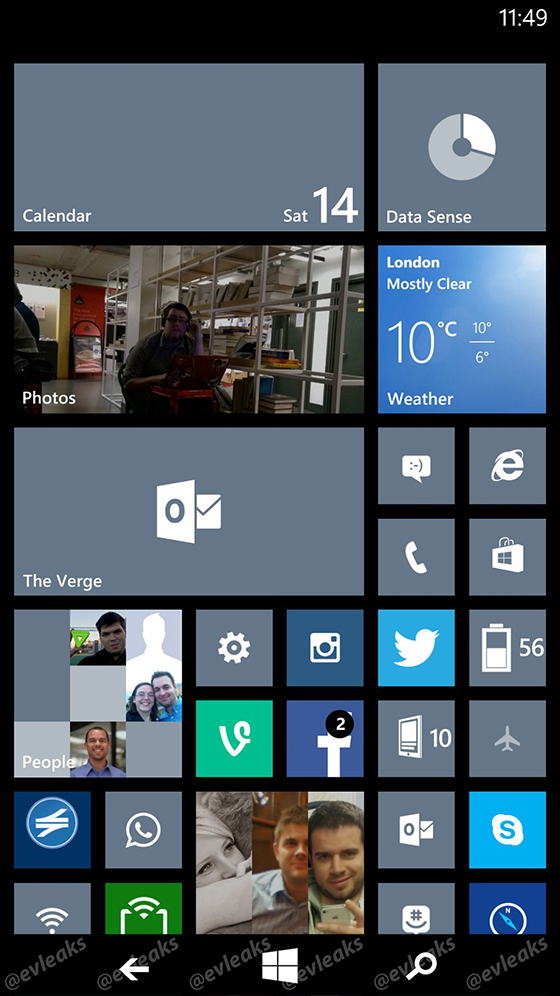
Microsoft is still testing its upcoming Windows Phone 8.1 update internally, but a leaked screenshot reveals how the company is moving to on-screen buttons in the future. The tiny image, published by @evleaks, shows the standard back, Windows, and search buttons all on-screen in a Windows Phone 8.1 screenshot. The Verge previously detailed how Microsoft is testing these virtual buttons as a replacement for devices without physical buttons. We have mocked up how the on-screen buttons are displayed alongside the Windows Phone 8.1 Start Screen in an image below.
Leaked Windows Phone 8.1 screenshot reveals new on-screen buttons


is a senior correspondent and author of Notepad, who has been covering all things Microsoft, PC, and tech for over 20 years.

We understand that Microsoft is removing the physical button requirement in an effort to lower costs for device manufacturers. It's an option for handset makers, and future devices without physical buttons will display on-screen virtual buttons, while other handsets will still ship with the standard capacitive buttons and no on-screen versions. Although it’s largely targeted at lowering costs, the removal of physical buttons could allow Android device makers to use almost identical hardware to produce Windows Phone handsets. Microsoft has been attempting to convince manufacturers to load Windows Phone software on their Android devices, and the company is even considering axing Windows Phone license fees to push device makers to consider the platform more.
Although today’s screenshot reveals very little about Windows Phone 8.1, Microsoft is planning to detail it publicly at the company’s BUILD 2014 conference next year. The update is expected to include a notification center, a "Cortana" personal assistant, Skype improvements, and a number of UI changes.
The image below is a mocked up version of the on-screen buttons.
Follow topics and authors from this story to see more like this in your personalized homepage feed and to receive email updates.


